Saturday, June 9, 2012

Google+ Hangout and Android

This post is for my friends, family, and people in cyberspace who ask me about Google Hangouts using their Android phones.  Google+ Hangout help and F1 are always your other options.
To have a Hangout, your Android device will need:
  • Android 2.3+
  • A front-facing camera
  • Hangouts will work best if you are connected to a high speed or wifi network. For the best audio quality, try using Hangouts with headphones.
1. If you haven't downloaded the Google+ app, download the Google+ app. For more information and additional options (iOS & web) click through the image.
2. Find your app, however YOU set up your apps. You can select the Google+ App or Messenger. Messenger is an option available on your Android device vice the computer. 

3. Select the option to start your hangout.  This screen capture displays one of many options for you to access Google+ hangouts depending on your device. Tap your expansion arrow next to your Stream and the drop down menu should display the options for you.

If you are using Android Apps in a learning environment or if you are an autodidact, check out Richard Byrne's, author of the Free Technology for Teachers blog, other blog Android 4 Schools where you can learn and tinker with the latest Android apps and devices that Mr. Byrne provides information about.

How do you help friends and family with stuff you have been using?
Comments, recommendations, +1s, and reaction box checks are welcome.

Wednesday, June 6, 2012

Update your browser or call your kids

A coworker shared this screen shot with us and it was the humor of the day:


Do you have a choice in the digital tools used in your work environment?

A previous post, How do you keep your stuff up to date? provides some additional screen shots when attempting to access Gmail or Google+ using the tools used in the work place.

Comments, recommendations, +1s, and reaction box checks are welcome.

Tuesday, June 5, 2012

Kids moving back home for the summer? Parents moving in for an extended stay?

Times are different for the generation suffering from the quarter age crisis. Today families are converging, whether it is to take care of a parent who needs a place to live or medical care, to young adults who realize life is not what they perceived once they crossed a high school or college graduation stage, or for financial reasons.

This Google Doc provides some basic parameters to document before the young adult child returns home for a temporary stay or if a parent, in law, or any other acquaintance moves in to your home for an extended stay. It is acceptable to set the ground rules, modify as agreed upon, and post them on a door in the home or on the net. Whether the cohabitants move is only for the summer break from school or for an extended stay, set the ground rules before those who are uber sensitive get their feelings hurt to the individual who thinks they are entitled to a place to stay without restitution.

It is also acceptable to have everyone come to the table with their top 10 rules and preferences, involve the digital devices, document the situation, and start a family blog. I am not the expert in this situation, but the 2010 census shows that 5.1 million households are considered multigenerational households sharing what we know, lessons learned, and what works in unique situations helps everyone involved.


Comments, recommendations, suggestions, and document ratings are always welcome.
Other external articles you may enjoy:
6 tips for living with boomerang kids by Steve Santiago @ Bankrate.com
Parenting Articles about Adult Children @ Empowering Parents
Adult Children Moving Home @ Frugal Dad

Saturday, June 2, 2012

Bugle Call apps iTunes and Google Play

One popular free app developed by service members and usable by many digital device users is the Bugle Call app. The Android app has 16 common bugle calls and the iTunes version contains 18 common bugle calls. This app is free and used with the military members and families, ROTC students, JROTC students, Girl and Boy Scouts, and others who use bugle calls for unique and diverse reasons. This app is available through iTunes and Google Play.
The iTunes version has 18 Bugle calls.
The Android version has 16 Bugle Calls
Bugle calls are also available on the web from a variety of sites and sources.
US Army Bugle Calls
US Scouting Bugling Merit Badge
Wikipedia Bugle Calls

How do you use Bugle calls? Ceremonies? Formal and informal learning environments? Family get togethers? Tinkering? Comments, recommendations +1s, and reaction check boxes are always appreciated.

Monday, May 28, 2012

VA National Cemeteries Gravesite Locator and ABMC

Memorial Day - A day to remember those who have paid the ultimate sacrifice. If you have a friend or family member who is buried in a VA National Cemetery, state veterans cemeteries, other military and Department of Interior cemeteries, or veterans buried in private cemeteries when the grave is marked with a government grave marker in the United States, you can use this tool to locate the gravesite. If you are looking for one of the sites overseas, the American Battle Monuments Commission manages that information.

Nationwide Gravesite Locator - Entering the last name is required, all other fields are optional. But as with any data search the more information entered the quicker and more accurate the results.
If you cannot locate the person you are searching for, you can provide the following information on each individual: Full name, including any alternate spellings, Date and place of birth, Date and place of death, State from which the individual entered active duty, Military service branch and mail the request to the address below.

Most requests take approximately four weeks for a reply. Include your return mailing address, phone number, or email address with the request. Mail your requests to: U.S. Department of Veterans Affairs
National Cemetery Administration (41C1)
Burial Location Request
810 Vermont Ave., NW
Washington, DC 20420

American Battle Monuments Commission (ABMC) manages 24 overseas military cemeteries, and 25 memorials, monuments, and markers. Nearly all the cemeteries and memorials specifically honor those who served in World War I or World War II.

American Battle Monuments Commission maintains databases which include:
  • Those interred at the American World War I and World War II cemeteries overseas.
  • The missing in action from World War I and World War II who are memorialized on Tablets of the Missing within the cemeteries and on three memorials in the United States.
  • Those killed worldwide during the Korean War.
  • War dead and veterans of the Mexican War, Civil War and Spanish-American War who are buried at the ABMC cemeteries in Corozal, Panama and Mexico City.
  • The missing in action of the Vietnam War memorialized at the Honolulu Memorial.
  • All interments at Corozal American Cemetery, including civilians who built and operated the Panama Canal.
How are you using the VA Cemeteries Gravesite Locator or the American Battle Monuments Commission databases? Comments, recommendations +1s, and reaction check boxes are always appreciated.

Sunday, May 27, 2012

Vote for your favorite park in Sprite Spark Parks Contest

Vote for your favorite park to win $15,000.00 to "get refreshed" sponsored by Coca Cola North America. The Contest ends on May 31, 2012 at 11:59 p.m. 

During the writing of this post Atlanta's Burdett Park and NY's Sorrentino Rec Center are hot swapping the first place position. All parks are set to get refreshed, Coca Cola is providing grants to help the public parks, so voter help decide the top 10 courts to receive $15K to assist in "getting refreshed".

10 First Place Grants - $15,000 that must be used to construct, refresh and/or refurbish basketball courts located in the Park.
10 Second Place Grants - $10,000 that must be used as specified above.
5 Third Place Grants - $5,000 that must be used as specified above.


25 Public Parks selected by the sponsor, Coca-Cola North America
Grayson Park Birmingham AL
Starlight Park Phoenix AZ
Hollywood Recreation Center Los Angeles CA
DeFremery Park Oakland CA
Emery Recreation Center Washington DC
Dorsey Park Miami FL
Burdett Park College Park GA
Evelyn Davis Park Des Moines IA
Washington Park Chicago IL
Indianaola Park Indianapolis IN
Portland Park Louisville KY
Gatto Playground New Orleans LA
Westown Commons Park Grand Rapids MI
Fox Park St. Louis MO
Elmira Park Durham NC
Frazier Park Charlotte NC
Sorrentino Recreation Center Far Rockaway NY
DeHart Park Cincinnati OH
Dermond Recreation Area Drexel Hill PA
Jesse Turner Park Memphis TN
Winzer Basketball Court Houston TX
Cotillion Park Dallas TX
Ethel Bailey Furman Memorial Park Richmond VA
Pratt Park Basketball Courts Seattle WA
Juneau Playground Milwaukee WI
Which park are you voting for?

Saturday, May 26, 2012

Do you pay for access to your online local newspaper?

Pay $6.95 to access the Augusta Chronicle online content? No thanks. The Augusta Chronicle allows "passers by" to visit what they deem as "Premium Content" up to 15 pages before seeing one of the prompts displayed in the image below.

I gave up the printed version of the Augusta Chronicle years ago. I use the online version to check out some local headlines but gave up reading it online after my last move in and out of Augusta because the comments demonstrated the need for commenting workshops, from the negativity of the commenters to those who type as they speak. The Augusta Chronicle is mentioned in PEJ's State of the News Media 2012 as they initially offered 100 page views at no cost to today's count of 15 free page views.
I will stick with WRDW, WJBF, and WAGT for my free local and Alltop for surrounding news feeds. I will occasionally view the Augusta Chronicle reporters on Google+ or Twitter but I will not pay $6.95 per month or $83.40 per year for what the AC deems as premium content. In addition to the price, notice the warning, "This page has insecure content".

Call me spoiled, but if I pay I do not expect to see the page has "insecure content" nor do I want to see ads. But as one commenter posted in the AC Publisher's article: Chronicle offers new ways to serve you in January 2011, "Only the ignorant will fail to see the value in the minimal charges" is yet another reason the holier than thou attitude will get you nowhere in Augusta. It is why people continue to get their Masters Tournament coverage from the national sources, vice the local premium content managers.

Augusta Chronicle did their research, but I opted for Pew's State of the News Media 2010, State of the Newpapers 2012, Pew's Project for Excellence in Journalism Summary of Newspapers and Charts and Tables that Internet users can access with no additional fees.

If the Augusta Chronicle offered content that mattered to me, provided relevant information for my educational journey, presented content that was secure, and displayed no advertisements, I might contemplate a fee based access. But I pay for my education and my Internet service, where I can access information from sources more credible, plausible, and verisimilar.

The Augusta Chronicle offers an app for Android, iPad, and iPhone/iPod Touch currently, "Free for a limited time". Do you pay for access to your local newspaper online information?
Comments, recommendations +1s, and reaction check boxes are always appreciated.

Tuesday, May 22, 2012

Single point of failure. Are you one?

Are you a single point of failure? Many people associate single points of failure (SPOF) with technology, but humans can be SPOFs too. The one life event that is guaranteed to occur when you are born is you will die. 
clip art
If you aren't working yourself out of your position, whether in the family unit or corporate organizations, you are setting people up for redundant work, frustration, and you are not fulfilling your DASH.

Whether someone takes time off from work, physically or mentally checks out, or simply takes a break from the family unit, someone always gets stuck. So start today...whether it is a personal diary with how the things work around the house and instructions on how to access the information once you are absent or if you make yourself holier than thou on the two way rifle range leave some tidbit of the treasure trove of your skills, knowledge, and abilities for someone to come along and keep the battle rhythm in sync. Adapt, implement, and overcome only goes so far when you have to continuously pick up the slack.

Take some time, do a self assessment, and leave the information for others who will replace you. If you don't like to write or type, make a video. Knowledge hoarding does not equal job security and when you pass don't leave additional "stuff to do"  for those you leave behind, they are already emotionally drained adjusting to loss of life. Assess the scenario, whether personal or professional as the the story of the Blind Men and an Elephant, then become one part of the resolution.

Monday, May 21, 2012

How are you using the Dictionary of American Regional English (DARE)?

This dictionary provides insight, supported by research, documenting differences in American Regional English. As your global connections expand via the net, this unique dictionary can provide an introduction to words and phrases you may never have heard before. DARE can be used with families that move or travel often, in classes where international students participate, or for those who are curious about why some people say what they say. Check out some examples of regional synonyms found in DARE.

What is DARE? From the University of Wisconsin site: The Dictionary of American Regional English (DARE) is a multi-volume reference work that documents words, phrases, and pronunciations that vary from one place to another place across the United States. Challenging the popular notion that our language has been "homogenized" by the media and our mobile population, DARE demonstrates that there are many thousands of differences that characterize the dialect regions of the U.S.

The site offers quizzes for your self assessment: DARE you to take our quiz DARE Volume III quiz DARE Volume IV quiz Volume I-III quiz

The printed book is available through Harvard University Press or use WorldCat to find the book in your local library.

ISBN numbers: 
Vol. I A-C 978-0-674-20511-6
Vol. II D-H 978-0-674-20512-3
Vol. III I-O 978-0-674-20519-2
Vol. IV P-Sk 978-0-674-00884-7
Vol. V Sl-Z 978-0-674-04735-8
Vol. VI Index


What else can you do with DARE?
State-by-state. See which communities DARE visited in your state
Listen to how we speak. Hear audio samples that demonstrate the rich variety of American language.
DARE you to take our quiz. Do you know a toot from a tush hog? Take our quiz and find out!
5 Questions with Joan Hall. Video DARE chief editor Joan Houston Hall discusses the five-decades-long project.
Historical word of the month from June 2009 to present.
100 Entries
Audio samples
You can follow DARE on Twitter.
Check out some examples of regional synonyms found in DARE

How are you using DARE?
Comments, recommendations +1s, and reaction check boxes are always appreciated.

Sunday, May 13, 2012

So you want to run for a position on the Richmond County Board of Education?

Many people qualify but for one reason or another they do not run for this position. Sometimes the reason is due to not knowing where to start. The first site you can check is the Augusta government website. Under the Departments tab select A-E, then Board of Elections. You can visit the RCBoEd site to see the school board members, districts, contact information and when their terms are due to expire. As you can see from the site, personnel holding the positions for Districts 1, 4, 5, 8, 10 (At large district) expire December 31, 2012. This means if you want to run for one of the positions, you must register between Wednesday, May 23 beginning at 9:00 AM and no later than (NLT) Friday, May 25, 2012 by noon.


Qualifying
Qualifying for partisan (Democrat and Republican) and non-partisan offices opens Wednesday, May 23, 2012 at 9:00 AM and closes at 12:00 Noon on Friday, May 25, 2012.
Information regarding the qualifications and requirements to seek public office may be found in the publication Qualifications and Disqualifications to Seek Public Office, which is published by the Georgia Secretary of State’s Office.

Georgia Government Transparency and Campaign Finance Act of 2010
To locate information on the Georgia Government Transparency and Campaign Finance Act of 2010 and to file campaign reports visit the Georgia Government Transparency and Campaign Finance Commission.

This information is from page 252 of the 272 pages of the Qualifications and Disqualifications for Holding State or County Elective Office in Georgia.
MEMBER, COUNTY BOARD OF EDUCATION
Qualifications
1. Must be a citizen of this state. 
2. Must have been a resident of the county from which elected for 12 months immediately
preceding election.
3. Must be a qualified voter. O.C.G.A. § 45-2-1
4. Must reside within the school district in which he or she seeks election and in the election
district which he or she represents. Ga. Const. Art. 8, § 5, ¶ 2 O.C.G.A. § 20-2-51
Cross-Reference:
Art. 8, § 5, ¶ 2, and O.C.G.A. § 20-2-51 establish county school districts under the management and control of a county board of education.
Annotation:
Residency requirements for the election of local school board members cannot be established
by local board bylaws. Op. Atty. Gen. U97-25.
5. Must not be
a) employed by or serving on the governing board of any private educational body or
institution;
b) employed by the local board of education and be on the same board;
c) employed by either the State Department of Education or the State Board of Education.
O.C.G.A. § 20-2-51 (c)
Term of Office and Election
6. Term of office is four years unless otherwise provided by local act or constitutional
amendment. Ga. Const. Art. 8, § 5, ¶ 2 O.C.G.A. § 20-2-52
7. Elected in the general election held on Tuesday following the first Monday in November
in each even-numbered year next preceding the expiration of the term of office.
O.C.G.A. § 21-2-9
8. Elected in partisan elections unless nonpartisan elections are provided for by local law.
O.C.G.A. §§ 20-2-56, 21-2-139
9. A candidate for member of a county board of education must pay a qualification fee or
file a pauper’s affidavit.
O.C.G.A. §§ 21-2-131, 21-2-132, 21-2-153
Annotations:
1. If a candidate is unable to pay required qualifying fee, candidate may execute a
pauper’s affidavit in lieu of qualifying fee and be afforded the opportunity to run.
Op. Atty. Gen. 72-48. See Georgia Socialist Workers Party v. Fortson, 315 F. Supp.
1035 (N.D. Ga. 1970).
2. A candidate for the final half of an unexpired term must pay the full qualification
fee just as if he or she were running for a full term. Op. Atty. Gen. U70-77.
3. For the purpose of computing qualifying fee, only the salary which the law provides
for the office directly involved should be included and not the additional compensation
paid for the ex-officio position held by the incumbent. Op. Atty. Gen. 70-53.
4. An elected official cannot rely on payment of an incorrectly advertised qualifying
fee to compel the governing authority to compensate the elected official beyond the
salary permitted by statute. Rowland v. Tattnall County, 260 Ga. 109, 390 S.E. 2d
217 (1990).

If you qualify, the next step is to bookmark this site, Georgia Government Transparency and Campaign Finance Commission and select your role, Candidate, Non-Candidate Committee, Lobbyist, Public Official, Qualifying Officer, State Employee, and/or Vendor. 

Select Candidate, check out the site and:
1. File a Declaration of Intention to Accept Contributions.
2. File a PIN Application for e-filing CCDR & PFD (Candidates / Elected Officials).
3. If you have  designated someone to file your reports or  if anyone is collecting your contributions or expending your contributions, file a Registration Form for a Candidate’s Campaign Committee.
4. File a form for Choosing Option of Separate Accounting.
5. File reports according to your schedule.

Do you want to see reports submitted by existing office holders or other campaign reports? Search reports by types:  Campaign Reports, Personal Financial Reports & Affidavits, Business Transaction Reports, Lobbyist Reports, Late/Non-Filer Reports, Campaign Contributions Map, Vendor Gifts Reports.

If you want to be one part of the change that you want, starting at the local level is an option.
Comments, recommendations +1s, and reaction check boxes are always appreciated.

Sunday, May 6, 2012

What do you recommend if you were visiting Augusta, GA?

SCCC (Signal Captains Career Course) Students come from diverse backgrounds and for our international students and branch transfer students, attending SCCC may be their first visit to Augusta, GA. Our Signal Officers may be assigned here or may not have visited Fort Gordon in a few years.

Two of the student officer positions that have to be filled in each class is the Social Officer and the Volunteer Officer positions. Today's students have many tools available because so many organizations have virtual social media connections but the lessons learned from these activities aren't shared except within classes and between peers. I started a post on milBook (CAC access required) for people who aren't used to sharing beyond the DoD firewalls, but this post is general visitor information that can be accessed publicly and provide an opportunity for people who have visited Augusta, GA to share what worked, what didn't work, and recommendations.

If you have visited Augusta, GA or passed through Fort Gordon, GA what are some of your favorite spots that you would recommend if friends and family passing through?

A few recommended sites:
Off limits establishments 
Fort Gordon MWR (Morale Welfare & Recreation)
Fort Gordon ACS (Army Community Service)
Fort Gordon's The Signal online newspaper
Augusta's government Visitor site 
Augusta Convention & Visitors Bureau 
Visit Augusta Twitter 
Visit Augusta Facebook 
Augusta Chronicle Things to do 
Augusta Chronicle Events Calendar
Garden City Jazz 
Metro Spirit Dining
Splash in the Boro Family Waterpark & Aquatic Center Statesboro, GA 
Graystone Ranch & Wildlife Center - Recently added Zipline & Zorb activities
Phinizy Swamp

What recommendations do you have for visiting Augusta, GA?

Saturday, May 5, 2012

Hey grads...add your email

It is that time of year where graduates are snail mailing their graduation announcements and invitations...Congrats! Great! But one simple request...will you please add your email address to your contact info with your announcement?

It isn't that I mind doing the snail mail thing...but come on now eCards and digital gift cards have been around since you were born.

The flip side of this is it is time for you to have a professional aspect to the email in your digital footprint. You may keep your settings private on the social media sites, but it is now time to upgrade to the working world. It may have been fun to Google yourself while you were in high school or college, but it is time to get serious about your digital footprint. Whether it is a future employer, a potential date, or your next landlord searching your digital activity has never been easier to access.
Congrats to those who are graduating at any level just remember to add your email address to your contact info if you are snail mailing the announcement. Scanning the announcement and emailing to me would have been acceptable too! Maybe the next set of graduates will do a blog post as their graduation announcement, set up a donation widget, and create their own version of a digital portfolio?

As this eHow article states in an article about proper etiquette for graduation announcements, that you may have family members that do not have Internet access so I understand that some people still need the proper, formal, snail mail version but if you can blast your latest accomplishment using technology...why not?

Again...congrats to all the grads!

Saturday, March 17, 2012

Camp Data no cost summer sessions

Registration forms for Camp Data should be available April 9, 2012 and submitted between April 16-30, 2012. This camp is a community outreach effort offered by Augusta's City IT department. Submit registration forms early as this is a no cost session and based on a first come first served basis. Transportation is not provided so start the car pool coordinating now.


Children ages 6-8 and 9-11 are invited to come and explore the exciting world of technology. If you have additional questions please contact the Information Technology department at 706-821-2522. 


Sunday, March 4, 2012

Docusign Ink App

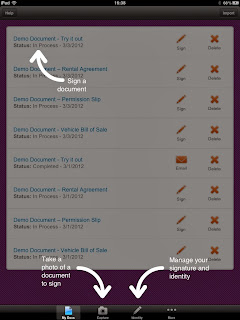
DocuSign Ink for personal use lets you sign and return ANY document sent to you as an email attachment or stored in a cloud service—for FREE. DocuSign Ink is available through the iTunes Store, Android Market, and as a plug in for Outlook through the Office Marketplace

Common Access Card holders have the option to use ApproveIt to digitally sign documents. Classroom images currently do not have ApproveIt installed. This situation will be resolved during the month of March as the classroom images are updated.

Screen capture from Android
Now the challenge is on to go paperless with some of the common documents that we use in the SCCC classrooms that require signatures. From vehicle inspection checklists that must be completed before every long weekend (government holiday, training holiday), student designed memorandums for record (MFR) for assignments, cover sheets of designated projects, to classroom QAO evaluation checklists, presenting options for those who use digital devices is another way to integrate digital tools. This provides another option for personnel participating in the iPad pilot.

As more SCCC students bring digital devices to the classroom, the budget cuts which always impact toner and paper purchases, the option to securely sign documents is a job requirement and a learning opportunity for the diverse group of SCCC students and their facilitators.

One issue that always arises is the security of the signature. As we are all aware, if something was created by humans, it can be hacked by humans. DocuSign has achieved ISO/IEC 27001:2005 certification as an information security management system. DocuSign Security and Legal information: 

  • DocuSign warrants Federal ESIGN Act and Gramm-Leach-Bliley Act (GLBA) compliance.
  • Exported signed documents are digitally sealed and verified for authenticity with a trusted third-party certificate authority.
  • Detailed audit trails for each transaction include sender name and email address, timestamps, and originating IP address for each action.
Are you using DocuSign in a learning environment? Or for personal or professional use? If so, how is it working for you?


Recent screenshot from the iPad and the Android (above) devices I am using to tinker with the DocuSign Ink app.


Some additional features of DocuSign:
Additional options for those using DocuSign for Business: Signing, Sending, Collaborating, Enterprise Management, Mobile, Legal and Security.


All types businesses are using Docusign and the marketplace options from Independent contractors, Realtors, Salesforce, Banking, to parents signing permission slips.


What digital signature tool do you use most often?


Comments, recommendations +1s, and reaction check boxes are always appreciated.

Sunday, February 26, 2012

Readability Indices, Google Docs, MS Word, Outlook, and Twitter Stream

A former SCCC student shared page 27 from DA PAM 25-40 Army Publishing: Action Officers Guide (published 11/7/2006) available through the Army Publishing Directorate. This page contains a Readability Grade Level nomograph with the steps to calculate Reading Grade Level.

Readability can also be enabled in Google DocsMicrosoft Word and Outlook. Google Docs and Microsoft Word provide three indicators of the reading level of the document you're creating. They will each calculate for you the Flesch Reading Ease, Flesch-Kincaid Grade Level, and the Automatic Readability Index. In Google Docs you visit the tools menu and select the word count option.
Outlook
  1. On the Tools menu, click Options.
  2. Click the Spelling tab, and then click Spelling and AutoCorrection.
  3. Click Proofing.
  4. Under When correcting grammar in Outlook, select the Check grammar with spelling check box.
  5. Select the Show readability statistics check box.
  6. After you enable this feature, open a file that you want to check, and check the spelling. When Outlook or Word finishes checking the spelling and grammar, it displays information about the reading level of the document.
Word
  1. Click the Microsoft Office Button, and then click Word Options.
  2. Click Proofing.
  3. Make sure Check grammar with spelling is selected.
  4. Under When correcting grammar in Word, select the Show readability statistics check box.
Through my social media stream EdTech SandyK shared this tweet:


There are many digital tools available to check for the reading grade level but what I like about Peter Krantz's tool is that it continues a discussion from a blog post he published in 2005. The online tool also calculates in languages other than English. The calculator uses the following formulas:

English: Flesch-Kincaid reading ease and grade level.
Spanish: Fernandez Huerta
French: Kandel & Moles
Swedish, Danish: LIX
Douman: Dutch


The Flesch-Kincaid Reading Ease - This score indicates how easy a text is to read. A high score implies an easy text. In comparison comics typically score around 90 while legalese can get a score below 10.

The Flesch-Kincaid Grade level indicates the grade a person will have to have reached to be able to understand the text. E.g. a grade level of 7 means that a seventh grader will be able to understand the text.

Peter Krantz's blog post from Septermber 2005: Methods for measuring text readability also contains links for those looking to improve their readability index.


While we have regulatory guidance, writing or Communicative Arts facilitators, digital tools, it boils down to what is old hat to you may be new to someone else. Continue to share your experiences, write publicly and privately because we all know that no one is perfect when it comes to writing and speaking.


As always, comments, recommendations +1s, and reaction check boxes are always appreciated.

Saturday, February 25, 2012

Heart Graph, Google search features and geeks are cool

Google search features are used for more than searching for the answers you are looking for and during Valentine's Day all types of things flow your social stream.

Heart hacks or graphing cardioids are popular and Google Students showed some love to math lovers http://googleforstudents.blogspot.com/2011/12/showing-some-love-to-math-lovers.html and shared this: (sqrt(cos(x))*cos(200x)+sqrt(abs(x))-0.7)*(4-x*x)^0.01, sqrt(9-x^2), -sqrt(9-x^2) from -4.5 to 4.5 (copy and paste into Google search box or Wolfram if you are a member), then some one started sharing this: sqrt(​1-​(abs(​x)-​1)^​2)arccos(​1-​abs(​x))-​Ï€

Graph for sqrt(​1-​(abs(​x)-​1)^​2)arccos(​1-​abs(​x))-​Ï€ produces this version:


Keep tinkering and demonstrating that Geeks are cool!
So what else do you use Google Search for with so many options available?
Various categories of popular features range from Everyday Essentials, Reference Tools, Choosing Keywords, Local Search, Health Search, Trip Planning, Query Refinements, and Search by Numbers ...What is your favorite?

Synonym Search - If you want to search not only for your search term but also for its synonyms, place the tilde sign (~) immediately in front of your search term.
Currency Conversion - To use our built-in currency converter, enter the conversion you’d like done into the Google search box and your answer will display directly on the results page.
Fill in the Blank - Sometimes the best way to ask a question is to get Google to ‘fill in the blank’ by adding an asterisk (*) at the part of the sentence or question that you want finished into the Google search box.
Related Search - To search for web pages that have similar content to a given site, type “related:” followed by the website address into the Google search box.


As always, comments, recommendations +1s, and reaction check boxes are always appreciated.

Sunday, February 5, 2012

Subway Breakfast Offer How was your experience?

In January 2012 the Subway Breakfast Sampling information passed through my social media feeds and I shared the information on a post through Google+, even my mom signed up.  It was an offer available in selected areas of South Carolina, Charlotte, NC, Asheville, NC, Augusta, GA and surrounding areas from January 30 through February 4, 2012. 

You visited the site , selected the Subway store, the breakfast sandwich, the day and time you wanted to visit the store and receive a breakfast sandwich and a cup of Seattle's Best coffee. You received a confirmation email and an option to add it to your calendar. You were given the choice to print the reservation and give it to the cashier or show the reminder on your smartphone. The day before the event I received an email reminder.  I even received a text message reminder.

So on Saturday morning, February 4, we headed out to our local Subway. We arrived a few minutes early and there were no lights on in the store and my mom said, "Oh they are probably inside doing the prep work and will open on time". I verified that we were at the correct store via the text message, Google Maps, and the Gmail confirmation on my smartphone. At 0805 we pulled up to read the hours of the store and it was supposed to be open at 0800. I tried calling the store but only received a busy signal.


We decided to wait it out. About 0810, the Subway employee pulled up, jumped out of her car motioned for me to roll down my window and said, "Give me 15 minutes I am running late". A few more cars pull up and people are starting to stand out side the door. About 0815 the Subway employee opens the door. The first family orders, then she announces, "No steak, no tomatoes, and no coffee". We asked her where was her help and she said no one else comes in until 0930. Then we asked where was Mr. David Bell, the manager, and whose name was on the email confirmation, she shrugged her shoulders and kept working as she had 4 groups of customers. I told her I was going to call her boss, not to punish her but that we all expected on the last day of the promotion that the event would be implementing the lessons learned from the beginning (January 30) until today. A customer tapped me on the arm and said, "I think that is his phone number" as she pointed to a sign on the cash register. Of course when I called the phone call went straight to voicemail.


So in addition to this blog post, comment on the G+ post, I am also submitting Customer Feedback to the local store via the Subway store site.

I don't have a problem with Subway, I have a problem with the customer experience. In the end, the breakfast sandwich was not bad but businesses should not build up the customer expectation just to let them down during the experience. Maybe my next experience will be better? If you participated in the Subway breakfast promotion how was your experience?

Saturday, January 28, 2012

The Innovator Academy - Thank You

One week ago, I saw something in my Twitter stream or Google+ stream of Knowledge Sharing Passionistas about the Innovator Academy


The page opened with, "Join the movement! Digital skills are the key to making a difference in education. Part contest/part learning experience, the Innovator Academy will introduce educators to digital tools, people, and places that will inspire curriculum innovation. Sign up to be a part of the Academy online at http://www.innovatoracademy.com and then you will receive a weekly email that gives the first clue to a learning web scavenger hunt.  The contest is free, no strings, no costs along the way - just a great way to learn and have fun at the same time.


I was catching up on email when the email from Innovator Academy came through. When I read it I figured I would respond but I certainly knew I wasn't first...but to my surprise a Google Alert  prompted me to see why my name was on the net and this is what displayed:


So if you want to participate in the web scavenger hunt check out the Innovator AcademyThe Currix Innovator Academy Scavenger Hunt takes place worldwide from Friday January 20, 2012 (01/20/12) to Sunday June 17, 2012 (06/17/12).


So what did I win?
This week's prize is a choice, a spot on the real Innovator Academy during ISTE 12 or a Wacom Bamboo Capture Tablet. 


Thank you Currix and Ann-Caryn Cleveland !
Follow Currix on Twitter or the hashtag #innovatoracademy

Monday, January 23, 2012

Lowe's Senior CLASS Award Vote for Paul Goldsmith


What is CLASS?
An acronym for Celebrating Loyalty and Achievement for Staying in School, the Lowe’s Senior CLASS Award was launched in 2001 to honor the attributes of college basketball seniors who remained committed to their university and pursued the many rewards that a senior season could bring.


Fan balloting counts for 1/3 of the total with the remaining 2/3 determined by NCAA Division I coaches and national media members. Please see the Selection Process section of the Lowe's Senior CLASS Award website for more information. Voting ends February 8, 2012.


No registration required. Vote for Paul Goldsmith Lowe's Senior CLASS Award
Goldsmith will graduate in May 2012 with a degree in sports management, physical education and health. More information about Paul on his page


I have known PJ since he was in elementary school and his mom and I were stationed in Alaska. I am proud to call her my friend, mentor, and one of the blessed breast cancer survivors. I wanted to do what I could to show PJ that I am also proud of everything he has accomplished.  


Of course all of the students on the ballot deserve credit for their accomplishments and the positive impact in their digital portfolios. Congrats to all of the students for being nominated for Lowe's Senior CLASS Award!


Thanks in advance for your support!

Sunday, January 22, 2012

What a difference a generation makes with gadgets

We acquired our first networked computer in the house when my daughter started Kindergarten. Now her daughter, at 20 months, in this multigenerational household is exposed to a wireless network, gadgets and terminology such as smartphones, tablets, mobile devices, and laptops.


GGMa Flo who used a beeper during her career days and experienced Atari as the family game console, who didn't grow up with the Internet is now an Internet addict. My daughter who grew up with the technology as we shared many lessons learned from online school to teens tinkering with social media, implements security and privacy measures while sharing select information with her designated Internet connections. And the G-daughter who is growing up with everything Google and is the next generation gadget girl is exposing us all to the wonders of tech through a toddler's eyes.


And me...well I get to be the Network Manager, technogeek, still attempting to educate the end users to be mindful of the information they release and how to hit the F1 key to help themselves, and to tinker.


We use ebooks, multimedia books, Sesame Street and Disney Junior channels on YouTube, a shared Picasa album, Android and iPad apps for children, shared Google calendar for appointments, medicine, milestones, and special events.


The Department of Defense attempts to educate family members on OPSEC as they realized education was better than banning, so the Social Media hub was developed for all services to share Internet based capabilities policies, training and education sources. How are you influencing the family social media policy? How do you educate family users on security topics such as computer security, information security, operation security, personal security?

Some sites that may be of interest:
Free OPSEC training material from the OPSEC Professional's Association
US Army Social Media 
US Army Online and Social Media Division Slideshare