SCCC (Signal Captains Career Course) Students come from diverse backgrounds and for our international students and branch transfer students, attending SCCC may be their first visit to Augusta, GA. Our Signal Officers may be assigned here or may not have visited Fort Gordon in a few years.
Two of the student officer positions that have to be filled in each class is the Social Officer and the Volunteer Officer positions. Today's students have many tools available because so many organizations have virtual social media connections but the lessons learned from these activities aren't shared except within classes and between peers. I started a post on milBook (CAC access required) for people who aren't used to sharing beyond the DoD firewalls, but this post is general visitor information that can be accessed publicly and provide an opportunity for people who have visited Augusta, GA to share what worked, what didn't work, and recommendations.
If you have visited Augusta, GA or passed through Fort Gordon, GA what are some of your favorite spots that you would recommend if friends and family passing through?
A few recommended sites:
Off limits establishments
Fort Gordon MWR (Morale Welfare & Recreation)
Fort Gordon ACS (Army Community Service)
Fort Gordon's The Signal online newspaper
Augusta's government Visitor site
Augusta Convention & Visitors Bureau
Visit Augusta Twitter
Visit Augusta Facebook
Augusta Chronicle Things to do
Augusta Chronicle Events Calendar
Garden City Jazz
Metro Spirit Dining
Splash in the Boro Family Waterpark & Aquatic Center Statesboro, GA
Graystone Ranch & Wildlife Center - Recently added Zipline & Zorb activities
Phinizy Swamp
What recommendations do you have for visiting Augusta, GA?
Sunday, May 6, 2012


Saturday, May 5, 2012
Hey grads...add your email
It is that time of year where graduates are snail mailing their graduation announcements and invitations...Congrats! Great! But one simple request...will you please add your email address to your contact info with your announcement?
It isn't that I mind doing the snail mail thing...but come on now eCards and digital gift cards have been around since you were born.
The flip side of this is it is time for you to have a professional aspect to the email in your digital footprint. You may keep your settings private on the social media sites, but it is now time to upgrade to the working world. It may have been fun to Google yourself while you were in high school or college, but it is time to get serious about your digital footprint. Whether it is a future employer, a potential date, or your next landlord searching your digital activity has never been easier to access.
Congrats to those who are graduating at any level just remember to add your email address to your contact info if you are snail mailing the announcement. Scanning the announcement and emailing to me would have been acceptable too! Maybe the next set of graduates will do a blog post as their graduation announcement, set up a donation widget, and create their own version of a digital portfolio?
As this eHow article states in an article about proper etiquette for graduation announcements, that you may have family members that do not have Internet access so I understand that some people still need the proper, formal, snail mail version but if you can blast your latest accomplishment using technology...why not?
Again...congrats to all the grads!
It isn't that I mind doing the snail mail thing...but come on now eCards and digital gift cards have been around since you were born.
The flip side of this is it is time for you to have a professional aspect to the email in your digital footprint. You may keep your settings private on the social media sites, but it is now time to upgrade to the working world. It may have been fun to Google yourself while you were in high school or college, but it is time to get serious about your digital footprint. Whether it is a future employer, a potential date, or your next landlord searching your digital activity has never been easier to access.
Congrats to those who are graduating at any level just remember to add your email address to your contact info if you are snail mailing the announcement. Scanning the announcement and emailing to me would have been acceptable too! Maybe the next set of graduates will do a blog post as their graduation announcement, set up a donation widget, and create their own version of a digital portfolio?
As this eHow article states in an article about proper etiquette for graduation announcements, that you may have family members that do not have Internet access so I understand that some people still need the proper, formal, snail mail version but if you can blast your latest accomplishment using technology...why not?
Again...congrats to all the grads!
Saturday, March 17, 2012
Camp Data no cost summer sessions
Registration forms for Camp Data should be available April 9, 2012 and submitted between April 16-30, 2012. This camp is a community outreach effort offered by Augusta's City IT department. Submit registration forms early as this is a no cost session and based on a first come first served basis. Transportation is not provided so start the car pool coordinating now.

Children ages 6-8 and 9-11 are invited to come and explore the exciting world of technology. If you have additional questions please contact the Information Technology department at 706-821-2522.
Sunday, March 4, 2012
Docusign Ink App
DocuSign Ink for personal use lets you sign and return ANY document sent to you as an email attachment or stored in a cloud service—for FREE. DocuSign Ink is available through the iTunes Store, Android Market, and as a plug in for Outlook through the Office Marketplace.
Common Access Card holders have the option to use ApproveIt to digitally sign documents. Classroom images currently do not have ApproveIt installed. This situation will be resolved during the month of March as the classroom images are updated.
Now the challenge is on to go paperless with some of the common documents that we use in the SCCC classrooms that require signatures. From vehicle inspection checklists that must be completed before every long weekend (government holiday, training holiday), student designed memorandums for record (MFR) for assignments, cover sheets of designated projects, to classroom QAO evaluation checklists, presenting options for those who use digital devices is another way to integrate digital tools. This provides another option for personnel participating in the iPad pilot.
As more SCCC students bring digital devices to the classroom, the budget cuts which always impact toner and paper purchases, the option to securely sign documents is a job requirement and a learning opportunity for the diverse group of SCCC students and their facilitators.
One issue that always arises is the security of the signature. As we are all aware, if something was created by humans, it can be hacked by humans. DocuSign has achieved ISO/IEC 27001:2005 certification as an information security management system. DocuSign Security and Legal information:
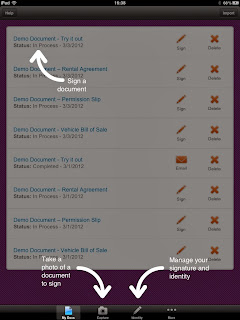 Recent screenshot from the iPad and the Android (above) devices I am using to tinker with the DocuSign Ink app.
Some additional features of DocuSign:
Additional options for those using DocuSign for Business: Signing, Sending, Collaborating, Enterprise Management, Mobile, Legal and Security.
All types businesses are using Docusign and the marketplace options from Independent contractors, Realtors, Salesforce, Banking, to parents signing permission slips.
What digital signature tool do you use most often?
Comments, recommendations +1s, and reaction check boxes are always appreciated.
Common Access Card holders have the option to use ApproveIt to digitally sign documents. Classroom images currently do not have ApproveIt installed. This situation will be resolved during the month of March as the classroom images are updated.
 |
| Screen capture from Android |
As more SCCC students bring digital devices to the classroom, the budget cuts which always impact toner and paper purchases, the option to securely sign documents is a job requirement and a learning opportunity for the diverse group of SCCC students and their facilitators.
One issue that always arises is the security of the signature. As we are all aware, if something was created by humans, it can be hacked by humans. DocuSign has achieved ISO/IEC 27001:2005 certification as an information security management system. DocuSign Security and Legal information:
- DocuSign warrants Federal ESIGN Act and Gramm-Leach-Bliley Act (GLBA) compliance.
- Exported signed documents are digitally sealed and verified for authenticity with a trusted third-party certificate authority.
- Detailed audit trails for each transaction include sender name and email address, timestamps, and originating IP address for each action.
Recent screenshot from the iPad and the Android (above) devices I am using to tinker with the DocuSign Ink app.Some additional features of DocuSign:
Additional options for those using DocuSign for Business: Signing, Sending, Collaborating, Enterprise Management, Mobile, Legal and Security.
All types businesses are using Docusign and the marketplace options from Independent contractors, Realtors, Salesforce, Banking, to parents signing permission slips.
What digital signature tool do you use most often?
Comments, recommendations +1s, and reaction check boxes are always appreciated.
Sunday, February 26, 2012
Readability Indices, Google Docs, MS Word, Outlook, and Twitter Stream
A former SCCC student shared page 27 from DA PAM 25-40 Army Publishing: Action Officers Guide (published 11/7/2006) available through the Army Publishing Directorate. This page contains a Readability Grade Level nomograph with the steps to calculate Reading Grade Level.


There are many digital tools available to check for the reading grade level but what I like about Peter Krantz's tool is that it continues a discussion from a blog post he published in 2005. The online tool also calculates in languages other than English. The calculator uses the following formulas:
English: Flesch-Kincaid reading ease and grade level.
Spanish: Fernandez Huerta
French: Kandel & Moles
Swedish, Danish: LIX
Douman: Dutch
The Flesch-Kincaid Reading Ease - This score indicates how easy a text is to read. A high score implies an easy text. In comparison comics typically score around 90 while legalese can get a score below 10.
The Flesch-Kincaid Grade level indicates the grade a person will have to have reached to be able to understand the text. E.g. a grade level of 7 means that a seventh grader will be able to understand the text.
Peter Krantz's blog post from Septermber 2005: Methods for measuring text readability also contains links for those looking to improve their readability index.
While we have regulatory guidance, writing or Communicative Arts facilitators, digital tools, it boils down to what is old hat to you may be new to someone else. Continue to share your experiences, write publicly and privately because we all know that no one is perfect when it comes to writing and speaking.
As always, comments, recommendations +1s, and reaction check boxes are always appreciated.
Readability can also be enabled in Google Docs, Microsoft Word and Outlook. Google Docs and Microsoft Word provide three indicators of the reading level of the document you're creating. They will each calculate for you the Flesch Reading Ease, Flesch-Kincaid Grade Level, and the Automatic Readability Index. In Google Docs you visit the tools menu and select the word count option.
Outlook- On the Tools menu, click Options.
- Click the Spelling tab, and then click Spelling and AutoCorrection.
- Click Proofing.
- Under When correcting grammar in Outlook, select the Check grammar with spelling check box.
- Select the Show readability statistics check box.
- After you enable this feature, open a file that you want to check, and check the spelling. When Outlook or Word finishes checking the spelling and grammar, it displays information about the reading level of the document.
- Click the Microsoft Office Button, and then click Word Options.
- Click Proofing.
- Make sure Check grammar with spelling is selected.
- Under When correcting grammar in Word, select the Show readability statistics check box.
There are many digital tools available to check for the reading grade level but what I like about Peter Krantz's tool is that it continues a discussion from a blog post he published in 2005. The online tool also calculates in languages other than English. The calculator uses the following formulas:
English: Flesch-Kincaid reading ease and grade level.
Spanish: Fernandez Huerta
French: Kandel & Moles
Swedish, Danish: LIX
Douman: Dutch
The Flesch-Kincaid Reading Ease - This score indicates how easy a text is to read. A high score implies an easy text. In comparison comics typically score around 90 while legalese can get a score below 10.
The Flesch-Kincaid Grade level indicates the grade a person will have to have reached to be able to understand the text. E.g. a grade level of 7 means that a seventh grader will be able to understand the text.
Peter Krantz's blog post from Septermber 2005: Methods for measuring text readability also contains links for those looking to improve their readability index.
While we have regulatory guidance, writing or Communicative Arts facilitators, digital tools, it boils down to what is old hat to you may be new to someone else. Continue to share your experiences, write publicly and privately because we all know that no one is perfect when it comes to writing and speaking.
As always, comments, recommendations +1s, and reaction check boxes are always appreciated.
Subscribe to:
Posts (Atom)