Monday, March 9, 2015

Safari for Schools and ConnectEd tools for students, educators, and schools

Students, Educators, Parents, Caregivers of K-12 students in the United States

Check out Safari for Schools, part of the ConnectEd initiative.


If you are a parent of a US K-12 student, caregiver, or educator, and do not have an Edmodo account, create a free account.
If you currently have an Edmodo account, access Safari for Schools and log in with your Edmodo account. Then you can access every current book and video course from O'Reilly Media.

Edmodo Google Play
Edmodo iTunes

Parents, caregivers, and students, if your educator won't participate, elevate your concerns to someone who can resolve them. There is no reason anyone should deny the U.S K-12 students access to this valuable resource.

Taxpayers get involved there is no reason your local school districts that receive taxpayers funds aren't participating in this program. Check your local districts book budget, you may be surprised.

Check out the other resources available for schools, teachers, and students through the ConnectED resources.

Resources for students
Autodesk Autodesk is a world leader in 3D design, engineering, and entertainment software for manufacturing, building and construction, and media and entertainment.

edX Free Verified Certificates for Students in High-Need Schools Students in U.S. Title I and high-need schools interested in courses to prepare for AP* exams, will also be able to earn a free verified certificate from edX.

Esri Esri will provide free access to ArcGIS Online Organization accounts — the same GIS technology used by government and business — to every U.S. K-12 school in America. These allow users to map and analyze data, create and share content, and collaborate in the cloud — via computers, tablets, or smartphones, anytime, anywhere connected.

Safari books Online and O'Reilly Media pledged to share over $100m of ebooks and videos that will teach students vital technology skills like coding, web design, and more.

For Schools and Educators

If you’re a school administrator, teacher, or student, get more details below about these companies’ commitments — and find out how you can take advantage.

For Schools Adobe, Apple, AT&T, Autodesk, Esri, Microsoft, Prezi, Sprint, Verizon

For Teachers  Adobe, Autodesk, Coursera, edX, Esri, Microsoft, O'Reilly Media, Prezi, Verizon
These are private funding programs administered by the respective sponsors. These are not government grant programs. The availability and administration of these funding opportunities, including the selection of recipients and all other decisions of the funding program, are not endorsed by any federal agency or office. No federal funds are being used in or for the administration or awarding of these private funding opportunities.




Monday, January 19, 2015

Another day where reflection and service are expected

Found this post from 2009 in my drafts, six years later it is still relevant with the removal of one phrase referencing the upcoming Inauguration.

For many people giving back to the community is something they do regularly...supporting schools, students, community members, educators, neighbors, by random acts of kindness or deliberate discussions.

In celebration of Martin Luther King, Jr. Day many people are doing a variety of things. Visit the government website and share what you are doing in support of Martin Luther King, Jr. Day, find a place to serve, search all things #MLKDay, and learn more about MLK Day.

So while you may be basking in celebration for the Super Bowl contenders, concerned about homework, job searches, where the next paycheck is coming from, ailing family members...take a moment and doing something nice.

If you are a regular practitioner of random acts of kindness or volunteer, you understand the healing and calming powers of what giving back means. You will be surprised at how healing and calming.

Take what you can in the spirit of MLK Day and use it to prepare for International Random Acts of Kindness Week February 9-15, 2015. 


How wonderful it is that nobody need wait a single moment before starting to improve the world. ~Anne Frank


Open Security Training


Another resource for my fellow autodidacts, tinkerers, people working in resource constrained environments, and those who seek to exercise their innate sense of curiosity.

OpenSecurityTraining
http://opensecuritytraining.info/Training.html
Current stats:
61 days of open source class materials
28 classes (13 with videos)
24 instructors

Includes What’s New at the Site? to annotate changes and modifications

Beginner Classes
•Android Forensics & Security Testing
•Certified Information Systems Security Professional (CISSP)® Common Body of Knowledge (CBK)® Review
•Flow Analysis & Network Hunting
•Hacking Techniques and Intrusion Detection
•Introductory Intel x86: Architecture, Assembly, Applications, & Alliteration
•Introductory Intel x86-64: Architecture, Assembly, Applications, & Alliteration
•Introduction to ARM
•Introduction to Cellular Security
•Introduction to Network Forensics
•Introduction to Secure Coding
•Introduction to Vulnerability Assessment
•Introduction to Trusted Computing
•Offensive, Defensive, and Forensic Techniques for Determining Web User Identity
•Pcap Analysis & Network Hunting
•Malware Dynamic Analysis
•Secure Code Review
•Smart Cards
•The Life of Binaries
•Understanding Cryptology: Core Concepts
•Understanding Cryptology: Cryptanalysis

Intermediate Classes
•Introduction to Software Exploits (Exploits 1)
•Exploits 2: Exploitation in the Windows Environment
•Intermediate Intel x86: Architecture, Assembly, Applications, & Alliteration

Advanced Classes
•Advanced x86: Virtualization with Intel VT-x
•Introduction to Reverse Engineering Software
•Reverse Engineering Malware
•Rootkits: What they are, and how to find them
•The Adventures of a Keystroke: An in-depth look into keylogging on Windows

External Resources

Sunday, November 16, 2014

Pre K Penmanship Activities Digital and Print

As the weather turns cooler and the holidays (and possible snow days) approach you may have some little ones around. Why not create a few penmanship papers for them to doodle with or demonstrate their newly learned skills while they are on holiday or snowed in during the winter weather days?.


I have to give some credit to +Kimberly Geswein  for sharing the KG Primary Penmanship Fonts  . Read the comments. If you use editing tools in your text document tools, you may want to turn them off when you create a document with the KG Primary Fonts with lines. Of course, always review the product in the print preview mode before you print. Now if we can get that font in Google Docs, that would be great.

I also have to give some credit to Donna Young and her home school site (+DonnaYoung.org). If you are snowed in with little ones, Donna's site has something you can use for all learning levels.

I also used some free fonts from Educational Fontware

These are just a couple of tools that family and friends may want to incorporate with the little ones around who want to show you what they have learned or some fun activities to refresh your old school learning with those who will replace us. I created a few worksheets so the GBaby can practice and showcase her penmanship over the holidays and possible snow days.

Gone digital?

I have to give props to +Richard Byrne who blogs at Free Technology for Teachers (and is present in so many social media streams) for sharing this blog post in December 2011, 123s ABCs - A Handwriting Practice App for Android Devices. Hat tip to +Richard Byrne and his +Free Technology for Teachers blog. I look to his blog for many reasons but particularly regarding learning, whether for myself, friends, family, wounded warriors or people who need to expand their perspective.

Whatever your mobile device there are apps for babies and toddlers to enhance learning. Check the source, analyze the permissions, and ruggedize your device before putting the device in the little one's hands. Whether you search Google Play , iTunes , or Amazon Apps, or Windows Phone Apps there are apps for everyone. Enjoy your shared teachable and learning moments throughout the year.


It is hard to believe that a year ago I wrote, Turned the old smart phone into a child friendly device for the GBaby, November 3, 2013.

While going through this learning adventure with the GBaby, I am reminded how my penmanship has regressed over the last 20 years while integrating technology into my own life.

Thanks to +PBS KIDS and +Sesame Street for providing many activities for the family to do throughout the year too.

So what apps and activities are you integrating to keep the youngsters' gray matter active during the holidays and snow days?


Sunday, August 3, 2014

Wow - Over 90 days since...

Wow over 90 days since I have done a blog post. What kept me so busy that I didn't stick to my requirement to do at least one blog post per month?

So I took an employer funded college course as described in my last blog post in April 2014, Lots of reading with ADED 6487 Instructional Strategies in Adult Learning, went to Fort Leavenworth, Kansas and completed the CES Advanced Course, and I am enjoying the great weather before fall and winter arrive. Of course the 4 year old Gbaby keeps me on my toes and sometimes I just do not have the energy to do any creative writing at the end of the day.


I have been more active behind the DoD firewall with milSuite and Intelink, so I haven't totally stopped blogging and participating digitally.

So I will recommit to posting at least once a month, while continue reading other blogger's posts.


Saturday, April 5, 2014

Lots of reading and inventories in ADED 6487

Hopefully, we had our last snowfall last Sunday. I have no idea how +Richard Byrne lives in weather colder and more snowier than I prefer and still finds time to write. I am glad he finds the time, passion, and energy for his blogs and teachings.

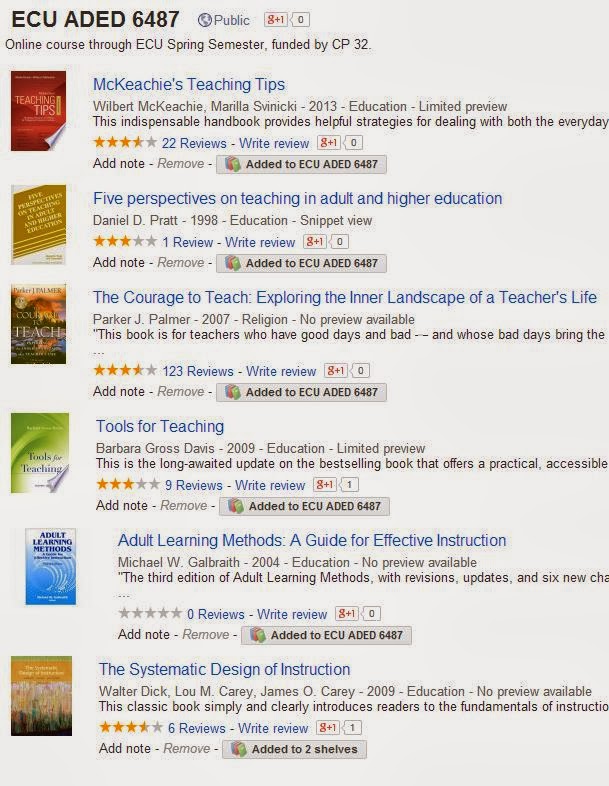
Back in January 2014, I started ADED 6487 Instructional Strategies in Adult Learning with +East Carolina University with two text books. Our professor provides supplemental reading assignments in our module challenges. The supplemental readings have lengthy bibliographies, so I bookmark a few of the referenced articles for my own additional reading. I have a Google bookshelf for this class.

So what have I been reading/doing since January? (last blog post was January 2014) 

We took the Philosophy of Adult Education Inventory (PAEI) and the Teaching Perspectives Inventory early in the course with the option to take them again at the end of the course or at any other time since the tools are available online.

In no particular order and in text format so you can convert to your required format for your own references, APA, MLA, Chicago, Turabian, and more. Asterisks indicate the required readings from the textbooks or supplemental readings.

  1. *Dick, W., Carey, L., & Carey, J. O. (2009). The systematic design of instruction. Upper Saddle River, N.J: Merrill/Pearson.
  2. *Svinicki, M. D., McKeachie, W. J., & McKeachie, W. J. (2014). McKeachie's teaching tips: Strategies, research, and theory for college and university teachers. Belmont, CA: Wadsworth, Cengage Learning.
  3. *Booth, M., & Schwartz, H. L. (2012). We're all adults here: Clarifying and maintaining boundaries with adult learners. New Directions for Teaching and Learning, 2012(131), 43-55.
  4. *May, G. L., & Short, D. (2003). Gardening in cyberspace: A metaphor to enhance online teaching and learning. Journal of Management Education, 27(6), 673-693.
  5. McWilliam, E. L. (2005). Unlearning pedagogy. Journal of Learning Design, 1(1), 1-11.
  6. Trilling, B., & Fadel, C. (2009). 21st century skills: Learning for life in our times. John Wiley & Sons.
  7. *Galbraith, M. (2004). Adult learning methods: A guide to effective instruction, 3rd ed, Malabar, FL: Krieger Publishing 
  8. *Palmer, P. (2007).  The courage to teach: Exploring the inner landscape of a teacher's life. San Francisco, CA: Jossey-Bass.
  9. *Pratt, D., & Collins, J. (2014). Teaching perspectives inventory. Retrieved from http://www.teachingperspectives.com/drupal/
  10. *Pratt, D. D. (2005). Five perspectives on teaching in adult and higher education. Malabar, Fla: Krieger Pub. Co.
  11. *Zinn, L. (1994). The philosophy of adult education inventory. Retrieved from http://www25.brinkster.com/educ605/paei_howtouse.htm
  12. *Blumberg, P. (2009). Maximizing learning through course alignment and experience with different types of knowledge. Innovative Higher Education 34, p. 93 - 103.
  13. *Weinstein, C. E., Acee, T. W., & Jung, J. (2011). Self‐regulation and learning strategies. New Directions for Teaching and Learning, 2011(126), 45-53.
  14. Swan, K., Shea, P., Fredericksen, E., Pickett, A., Pelz,W.,& Maher, G. (2000). Building knowledge building communities: Consistency, contact and communication in the virtual classroom. Journal of Education Computing Research, 23(4), 359-383.
  15. Coppola, N.W., Hiltz, S. R., & Rotter, N. G. (2002). Becoming a virtual professor: Pedagogical roles and asynchronous learning networks. Journal of Management Information Systems, 18(4), 169-189.
  16. Gardner, S., Dean, C., and McKaig, D. “Responding to D in the Classroom: The Politics of Knowledge, Class, and Sexuality.” Sociology of Education, 1989, 62, 64–74.
  17. Buck, G. A., Mast, C. M., Latta, M.A.M., and Kaftan, J. M. “Fostering a Theoretical and Practical Understanding of Teaching as a Relational Process: A Feminist Participatory Study of Mentoring a Doctoral Student.” Educational Action Research, 2009, 17(4), 505–521.
  18. Boyd, D. (2014). It's Complicated: The Social Lives of Networked Teens. New Haven: Yale University Press. http://www.danah.org/
  19. Hattie, J., Biggs, J., and Purdie, N. Effects of learning skills interventions on student learning: A meta-analysis. Review of Educational Research, 1996, 66(2), 99–136.
  20. Hofer, B. K., and Yu, S. L. Teaching self-regulated learning through a “learning-to-learn” course. Teaching of Psychology, 2003, 30(1), 30–33.
It seems that every time I went to write a blog post or even jot down my ideas, other priorities took precedence from shoveling snow, prep for a colonoscopy, the colonoscopy, a root canal, to cleaning up after a potty accident, trips to the playground, shoveling snow, completing th Making Sense of Data course, career, family....well you know how life has priorities. I am reminded while taking this course and integrating into my life that I still do not have time to return to my doctoral studies. Hat tip to all my fellow doctoral students who stayed on target and completed their research and defended their dissertation. 

If you have any recommended readings for me, feel free to comment. At least I can take the a mobile device and read when I am waiting.

Thanks,


Saturday, January 18, 2014

Instructional Strategies in Adult Education textbooks and readings

I shared previous textbooks and readings from other courses I took over the years using Google Books. The most read section is in the Instructional Design Basics bookshelf.

Every now and then funding becomes available for careerists in my field (CP 32) to participate in college courses with East Carolina University. While many careerists have some type of degree, this opportunity allows one to connect with a college in this century, hone their distance/distributive learning skills, and if they desire go through the process to pursue another degree with their own funds.

The last course I took was in the Summer 2012 session. There were no textbooks associated with EDTC 7030, Web Teaching: Design and Developmentbut I did share some homework adventures through the blog and Google+.

With ADED 6487 Instructional Strategies in Adult Education there are two required textbooks and two optional textbooks and some additional readings from designated texts selected by our professor.

So here is another shared Google Bookshelf for ADED 6487.


How are you using your Google bookshelves?
Here is to another fun learning adventure.

Tuesday, December 24, 2013

Don't forget the little things and RAOKs are OK


Merry Chrismahanukwanzakah!
Last night on the way home, a car became disabled in front of me on a busy highway. The easy thing to do would have been just to go around them...but I didn't. A young man jumped out of the driver's side, went to the passenger side and took out a baby carrier and a young lady got out of the passenger side. For a brief minute I thought it was a joke. I turned on my flashers and asked the young lady if I could call anyone. Both of them busy on the phones trying to reach someone for help. She said they were calling friends.
I called family to let them know that I was staying on the road until some type of help arrived. I called the non emergency RCSO number. The dispatcher asked was I behind the described car (apparently someone called and reported a disabled vehicle). The dispatcher said a deputy is trying to get there. As you can see, traffic was backed up for miles.

They were a young couple with a one year old. People had comments and criticism as they drove by and I wished them "Happy Holidays, hope you never have an incident". I put the young lady and the baby in the back seat to stay warm. The deputy arrived and assessed the situation, jumped the car battery but it did not stay running. He stopped an 18 wheeler to block the traffic so we could push the car off the road. I waited with the young couple until the tow truck arrived to tow the car. The baby had been great the whole time, not a whimper, just mesmerized by his surroundings and probably wondering WTF. Of course with all of the phone calls for help phone batteries died. I let them use my car charger while we waited.

Of course, with the car incident, the young lady had to call off her job for the evening. The young man said he would ride with the tow truck driver. I volunteered to drive the young lady and her child home. On the way to take them home, the baby decides to exercise his lungs. We stopped at a convenience store and picked up some juice for the baby. I said this was the least I could do since over 100,000 cars passed us and not one person offered to stop and assist. I said I wish I could do something like Ellen does for people, but I am not that well off, so a juice it will be. 

I know it is that crazy time of year, but take a minute to pay it forward. It is the little things that matter whether you say, "Thank You" or ask (and mean it) if someone is OK. They asked why did I do what I did and I told them I would hope someone would do this for my daughter, mother, or myself if our vehicles became disabled. I took the picture and told them I would do a blog post about this event. Southern hospitality? Didn't see any of it last night. Even mentioned it to the deputy and he said he is not surprised.

So take a minute this season and practice a random act of kindness (RAOK), check on a neighbor, stop and check on the young couple broke down in the middle of traffic, or choose an idea from the Random Acts of Kindness site.

Remember there's no such thing as a small act of kindness. Every act creates a ripple with no logical end. Scott Adams Creator Of Dilbert Comic Strip

Merry Chrismahanukwanzakah!

Sunday, November 3, 2013

Turned the old smart phone into a child friendly device for the GBaby

After reading a diverse group of articles on "Reuse/Repurpose your old smart phone," I decided to repurpose the old S2 for the 3 year old GBaby. She tinkers with the iPad, Kindle, Chromebook, and our phones as I support her being platform agnostic...but this is her device. 

So what did I do?

First, I read many articles on the topic, good, bad, historical, recent, and indifferent. Tech Radar has a good read on, "How to make Android child friendly". But if you are looking to make that old device a webcam  a video monitor, or a kitchen aid, just Google, "reuse or repurpose old cell phone". The search produces so many choices and there so little time to read all 92,000 of them. Then I decided on a plan of action and the functional steps I did are:

1. Hard reset on the device, not a factory reset. How you do this is on your device is different based on the device. We opted for the option described in this Android forum that explains the factory and the hard resets. 

2. Synced it with my account. This might be a good time to create that other Google account to associate all of those games, books, and shows for kids.

3. Downloaded Kids Place from Google Play. As you can see the search for parental controls in Google Play produces many results. So tinker with a few, see what other techie parents/Gparents/guardians are using, and review the ToS (Terms of Service).


4. Download AppLock. Again, lots of choices, ask around, ask why and why not, and review ToS and make the selection on your preferences.


Even if you employ network defense tools, you still want to protect the device and the user, so you will want to download and install some type of antivirus app or add your device to your existing program. Because the ratings change month to month, check out the AV Test site with monthly reports, for mobile, home, and corporate users.

Then download/transfer all the child apps to the device. Kids Place lets you select the apps that the child will access and you can see screen shots and the video in Google Play. The only way out is with a PIN. So it works great with a toddler, not so much for the tinkering tweens and teens. By then you can do the family contract on using the device and accessing the home network.

Before you set the Kids Place as the default launch, adjust the settings for email, phone, Internet access, based on your parental control preferences. While this doesn't give her a free ticket to ride I have a little more peace about her using the device without her accidentally deleting my stuff or accessing something she shouldn't in her current mindset.

Of course, recycling and reselling are always options, but with the furloughs this year and the need to hone some tinkering skills and feed the autodidacticism in the family, why not repurpose that old device? What best practices and/or parental controls are you using with the gadget toddlers of today? Any recommended favorite apps?


Sunday, August 25, 2013

Add your favorite sports team schedule to your Google Calendar

If you use Google Calendar, you can add your favorite Sports team schedule to your calendar. Other calendar add on options exist such as Holidays, Contacts' birthdays and events, Day of the Year, Phases of the Moon, Stardates, Week Numbers, Sunrise and Sunset, Hebrew Calendar.  But Sports fans have options to add their favorite Baseball, Basketball, Cricket, Football, Hockey, Rugby, and Soccer schedules.

Don't forget to add those back to school team schedules to your calendar. Great opportunity for family collaboration with the gadgets headed back to classes this year.

NOTE: It is not possible to sync sports calendars with other calendar applications at this time.


Open your Google Calendar, select Other Calendars, then Browse Interesting Calendars. Then make your selection (s) and subscribe.

Football options include NFL, CFL, and NCAAF.

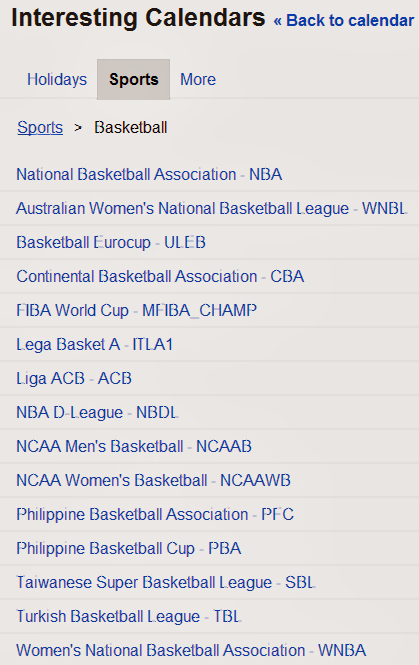
Basketball options include NBA, WNBA, TBL, SBL, PBA, PFC, NCAAWB, NCAAB, NBDL, ACB, ITLA1, MFIBA_CHAMP, CBA, ULEB, and WNBL


Even if you added your favorite sports team schedule to your calendar, revisit the options to see how many more are available today then when you made your first selection.

You can also add a friend's shared calendar, add a calendar by URL, import a calendar, create and manage your calendars.

What else are you adding to your calendars?


Sunday, August 11, 2013

Android Device Manager Have you set it up?

You can now set up your Android device with Android Device Manager as described in Google's blog post on August 2, 2013 titled, Dude, where's my phone? Simple steps to protect your Android this summer.

Make yourself aware of the notes and the steps required for the tools to remotely locate and factory reset your registered phone and/or tablet.

You can select the following options:
Ring. Ring your device at full volume for 5 minutes - even if it’s set to silent or vibrate.

Erase Device. Perform a factory reset, which permanently deletes all of your data.

Note from Android Device Manager help: 
If your device is offline, Android Device Manager won't be able to ring or erase the device until there is a mobile data or Wi-Fi connection. Select Erase Device in advance and your device's data is deleted when it is back online. Android Device Manager does not work for devices that are powered off.

If you have been using Lookout (for Android / for iPhone/iPad), you can already do this from the Lookout site or via the Lookout Chrome App. An additional feature offered by Lookout is Signal Flare, which saves the phone's location when the battery is low.

And users of the many Android mobile security apps have a diverse group of features depending on your preferences.


So have you activated your Android Device Manager yet? If not, what is your favorite mobile security app?


Monday, July 22, 2013

How do you know if that product is recalled OR Do you have Scoot N Zoom Model 711?

I was checking prices of some items before donating and posting the items for sale and I discovered that the Radio Flyer Scoot N Zoom Model#711 was recalled. You probably learned the old adage,  "Buyer beware" when you were growing up, but do you implement practical application of the adage?  I would also challenge people who donate items, buy or sell online or F2F yard/garage sales to use your digital connections to research products before donating, selling, reselling, or purchasing.


Here is the Radio Flyer site announcing the recall of the Scoot 'N Zoom with FAQs and an option to apply for the $20 refund. If you have the Scoot N Zoom with a yellow UPC on the bottom your item is good. If it does not, then apply for the refund.

Why is the product being recalled?  The Scoot 'N Zoom (model #711) is being voluntarily recalled because the product may tip over causing a child to fall while riding, posing a risk of injury.
When and where was this product sold?  It was sold primarily at Wal-Mart, and also certain other stores from August 2010 through August 2011.
Where was the item manufactured?  It was manufactured in the United States.
How do I verify if I have this product in my home?  If you have a yellow UPC Code on the bottom of your unit, you have a redesigned unit and it is NOT affected by this recall. However, if there is not a yellow UPC sticker on the bottom of your Scoot 'N Zoom, we will send you a $20 refund check.
Radio Flyer has a link to the CPSC Recall for the Scoot N Zoom dated August 16, 2011. 

The US Consumer Protection Safety Commission (CPSC) provides many options to keep up to date with recalled items, from a telephone number, email, Twitter, Recall widget, a Droid Reall app, APIs for developers and links for International recalls and US Government recalls. You can connect with the CPSC on YouTube, Blogger, Flickr, or Twitter. You can search for recalls or report dangerous items. Here is to your safety this summer.

Just another way to integrate your digital device with things you do in life and keep everyone safe.


Saturday, July 13, 2013

WrapStar - The Microphone

Cool gadget for the #GBaby and fun for adults too. She has tinkered with a couple versions of baby and toddler microphones but she wanted a real microphone. So we opted for the WrapStar.


I wanted to know the difference in the model numbers, WS101, WS102, WS103, and WS104 before purchasing one. I chatted with an Amazon agent who said she would get back to me in 2-3 business days. Then I contacted FirstAct via email and received a response the next day. Apparently the model numbers depict the different colors of the microphone.

Anyway...it arrived and she tinkered with it. The next day in the middle of her singing to her GGMa in a Google Hangout, it just stopped working. We changed the batteries, tried a variety of twists and straightening and the microphone was still not operational. We submitted the request for replacement through Amazon, who shipped the replacement out the next day. We returned the initial one that was not working. I don't know if we got a bad one but I recommend this for people of all ages. Kudos to Amazon's Customer Service for the quick turn around. It is available at a variety of retailers online and brick and mortar.

Do you have a WrapStar microphone? How are you enjoying it?


Saturday, June 22, 2013

Mapping with Google - Maps and Earth

Just completed the Mapping with Google Course with Maps and Earth.


System requirements to participate/complete the course:

  1. Completion of the Google Maps and Google Earth activities and projects for certificate credit requires an Internet-enabled device.
  2. For Google Earth, ensure your computer is able to run the current version of Google Earth by reviewing the related system requirements. Download the current version of Google Earth.
  3. Mapping with Google includes some components, such as video and text lessons, that are accessible from most smartphones and tablets.
  4. Participation in the optional Google+ hangouts requires a webcam-enabled device.


Some takeaways from the course:

  • You could add the city closest to you for a world view of students in the MOOC.
  • As part of this course, we had access to a new version of Google Maps not yet available to all users.
  • Google invites educators to apply for a free Pro version of Google Earth year round, and would like to extend a discount to Mapping with Google students completing the course. Upon submission of a Google Maps or Google Earth project in advance of the June 24, 2013 deadline, students will receive a coupon code for 50% off a Google Earth Pro license. Coupons will be viewable from the My Profile page once the certificate project has been received. The coupon is valid through June 29, 2013.
  • There are some awesome tours available in Google Earth. Visit a place that you want to visit but otherwise not doable. Just tinker...you may even discover an interest that you thought was boring and buried from your school days.
  • Visit some place you have been and enable the Historic views.
  • Many classroom ideas that can be used as family learning projects.
  • Don't forget to check out Sky, Moon, and Mars - Too cool and much improved since I did a blog post about Google Moon and Sky in 2008.
There are many things about this experience that I could write about, but the 3 year old Gbaby takes priority.

Thanks Google for the MOOC.


Sunday, June 2, 2013

Did you get this message?

If you receive a text message like this

Do not reply

Check out and use the GMail security checklist

What if you receive messages asking for personal information?
Sign in to Gmail.
Open the message you'd like to report.
Click the down arrow next to 'Reply', at the top-right of the message pane.
Select 'Report Phishing'.
If you do not have a Gmail account, but would like to report a Gmail user who is sending phishing messages, fill out this form.

Report spam
Report violations to the FTC
Report spam if you are outside of the US
File a complaint with the IC3 (Internet Crime Complaint Center)
Make yourself aware of Internet Trends and Schemes

What else do you recommend?


Thursday, May 23, 2013

Snake types and discovering Maryland's Herps

Yesterday I found this snake in the back yard. Posted the image on Google+ and asked if anyone knew what kind of snake it may be. I asked my neighbor to check it out because they have dogs and my concern was for the Gbaby. No response on Google+ but plenty of responses from neighbors, texts, and email connections.


By deductive reasoning, we have it narrowed down to two types. Northern Brown Snake and Eastern Garter Snake thanks to the Field Guide to Maryland's Herps section on the 27 snakes in Maryland.

So I have learned more about snakes since first moving to Georgia and participating in a required briefing about the area wildlife. So wherever you live, check out the resources available about the wildlife in your area. Many thanks to the groups that collaborated to provide this information and I appreciate how all participants are given credit on the site.

If you found a herp and aren't sure what group it belongs to, click on the silhouette to access the link to the field guide for that group. Amphibian groups in Maryland are salamanders, newts, frogs, and toads. Maryland reptiles groups include turtles, snakes, and lizards.

The Maryland Herpetology Field Guide is a cooperative effort of the MD Natural Heritage Program and the MD Biological Stream Survey within the Department of Natural Resources and their partners. We wish to thank all who contributed field records, text, and photographs, as well as support throughout its development.

The Maryland Amphibian and Reptile Atlas (MARA) is a five-year, joint project of the Natural History Society of Maryland and Maryland Department of Natural Resources. The information gained through your volunteer effort will be used to promote the conservation and protection of Maryland’s 90+ species of frogs, toads, salamanders, turtles, lizards, and snakes. You can submit your findings http://marylandnaturalist.org/submit-observation/

How do you discover information about unexpected backyard visitors? Is there a site where you  can submit your observations? Do you know the difference between newts, frogs, toads, turtles, snakes, and lizards?


Monday, May 6, 2013

Time to Review and Restock your first aid kit @ home, work, vehicles?

May is the busy month of celebrations from School Nurse appreciation Week and Day, Teacher appreciation week/day, Mother's Day, Cinco de Mayo, and way to many events to list in a blog post. Check out Brownie Locks and The 3 Bears site for daily, monthly, and unique events.

But take some time to ensure to restock your first aid kit. Whether you are the school nurse, an adventurist, or keep a pocket kit available, clean the kit out and restock the kits at home, work, and in your vehicles. The most used items need restocking, creams and liquids expire or evaporate, individual towelettes dry out, batteries need to be replaced, plastic and rubber materials dry rot depending on the environment the where the kit is stored, and special instructions and contact numbers need to be updated.

It may also be time to review or renew your CPR or AED training and certifications or sign up or host a local basic first aid course. While you are at it, check the fire extinguishers. You can have the tools but if you do not know how to use what is in the kit, the effort is useless.

If you never need a first aid kit...good for you! But for that paper cut, bug bite, unexpected splinter, or unplanned event...you never know when you will need something. Better to be prepared than never ready.

How do you schedule the review of your basic first aid kits? Monthly, Quarterly events on a shared calendar, make it a family event, involve the coworkers? 

Comments, +1s, and reaction check boxes are always welcome.

You may like
Free Technology Sharing Certificates
Ever spent time with the School Nurse?
Red Cross - Prepare Your First Aid Kit


Friday, April 26, 2013

Chrome net internals, troubleshooting the parent technology, and ERR_SOCKET_NOT_CONNECTED message

Every now and then my mom encounters a computer error that she cannot resolve. By the time she calls or sends a text she has done everything in her knowledge base to fix an issue. I gave her a moratorium during my moves that she must start using the F1 key, click on the question marks, or do a Google search to resolve her technology issues. 

So today she encountered an error that displayed Error 15 (net::ERR_SOCKET_NOT_CONNECTED): Unknown error.

A Google Search for this error message produces about 2,180 results. Sometimes clearing the cache and cookies resolves some basic connectivity issues but for this particular error she encountered, this response was helpful. Closing the idle sockets resolved her errors.

If you are using Chrome and come across a site you normally access and receive an unknown error message, check out the Net Internals Test function and see the test results.

The "chrome://net-internals/" webpage is a special URL in chromium that dumps a view of the network stack's internal state. This data can be helpful when debugging performance or connectivity problems. It includes information on request performance, proxy settings, and DNS cache.


With this function, input the URL that failed to load and press the Start Tests buttonNet Internals is described in the Chromium Projects.

Have you used any of Chrome's Net Internals or tinkered around the Chromium Projects while helping friends and family?


Saturday, April 20, 2013

From Chalkboard to Tablets presentation in DC

From Chalkboard to Tablets was presented in DC on April 19, 2013. I told myself if I was ever in the area I was going to attend one of the presentations given by Julie Evans.


I have multiple interests in the data provided by Speak Up National Research Project for the last 10 years:

  • As a parent of a high school student attending a school, in a district, with a NO mobile device policy
  • As a custodial GParent of a youngster growing up digital
  • As a doctoral student
  • As an employee who needs the next generation to be able to defend the nation's cyber interests
The report, From Chalkboard to Tablets, presentation, press releases and  the Congressional Briefing are available from the site.

The panelists provided a positive presentation and information about some schools that are integrating technology but as many of us know this is not the majority. While we have diverse tech skills amongst employees, students, educators, parents/GParents and those with access, when you look at the workforce replacements (current K-12) the diversity exists. Of course, the time with the panelists went quickly. I would still like to know the impact on students and educators who transfer in and out of the districts that have the great technology integrated programs. Due to career progression, economic factors, or military families I can only wonder what options do students have when transferring in and out of the technology integrated schools. Maybe another data set for the Project Tomorrow Team ?

I am glad I attended and met Julie. The next session is scheduled for June 4, 2013, 12-1330 @ the Capitol Visitor Center, House Visitor Center, Room 201 with a panel of Students. If you would like to attend, RSVP Jenny Hostert @ jhostert@tomorrow.org where the theme of the presentation is "Celebrating 10 years of giving a voice to students!"