Sunday, November 3, 2013

Turned the old smart phone into a child friendly device for the GBaby

After reading a diverse group of articles on "Reuse/Repurpose your old smart phone," I decided to repurpose the old S2 for the 3 year old GBaby. She tinkers with the iPad, Kindle, Chromebook, and our phones as I support her being platform agnostic...but this is her device. 

So what did I do?

First, I read many articles on the topic, good, bad, historical, recent, and indifferent. Tech Radar has a good read on, "How to make Android child friendly". But if you are looking to make that old device a webcam  a video monitor, or a kitchen aid, just Google, "reuse or repurpose old cell phone". The search produces so many choices and there so little time to read all 92,000 of them. Then I decided on a plan of action and the functional steps I did are:

1. Hard reset on the device, not a factory reset. How you do this is on your device is different based on the device. We opted for the option described in this Android forum that explains the factory and the hard resets. 

2. Synced it with my account. This might be a good time to create that other Google account to associate all of those games, books, and shows for kids.

3. Downloaded Kids Place from Google Play. As you can see the search for parental controls in Google Play produces many results. So tinker with a few, see what other techie parents/Gparents/guardians are using, and review the ToS (Terms of Service).


4. Download AppLock. Again, lots of choices, ask around, ask why and why not, and review ToS and make the selection on your preferences.


Even if you employ network defense tools, you still want to protect the device and the user, so you will want to download and install some type of antivirus app or add your device to your existing program. Because the ratings change month to month, check out the AV Test site with monthly reports, for mobile, home, and corporate users.

Then download/transfer all the child apps to the device. Kids Place lets you select the apps that the child will access and you can see screen shots and the video in Google Play. The only way out is with a PIN. So it works great with a toddler, not so much for the tinkering tweens and teens. By then you can do the family contract on using the device and accessing the home network.

Before you set the Kids Place as the default launch, adjust the settings for email, phone, Internet access, based on your parental control preferences. While this doesn't give her a free ticket to ride I have a little more peace about her using the device without her accidentally deleting my stuff or accessing something she shouldn't in her current mindset.

Of course, recycling and reselling are always options, but with the furloughs this year and the need to hone some tinkering skills and feed the autodidacticism in the family, why not repurpose that old device? What best practices and/or parental controls are you using with the gadget toddlers of today? Any recommended favorite apps?


Sunday, August 25, 2013

Add your favorite sports team schedule to your Google Calendar

If you use Google Calendar, you can add your favorite Sports team schedule to your calendar. Other calendar add on options exist such as Holidays, Contacts' birthdays and events, Day of the Year, Phases of the Moon, Stardates, Week Numbers, Sunrise and Sunset, Hebrew Calendar.  But Sports fans have options to add their favorite Baseball, Basketball, Cricket, Football, Hockey, Rugby, and Soccer schedules.

Don't forget to add those back to school team schedules to your calendar. Great opportunity for family collaboration with the gadgets headed back to classes this year.

NOTE: It is not possible to sync sports calendars with other calendar applications at this time.


Open your Google Calendar, select Other Calendars, then Browse Interesting Calendars. Then make your selection (s) and subscribe.

Football options include NFL, CFL, and NCAAF.

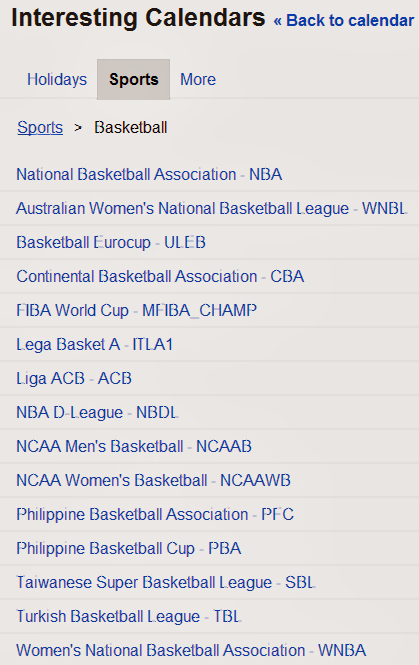
Basketball options include NBA, WNBA, TBL, SBL, PBA, PFC, NCAAWB, NCAAB, NBDL, ACB, ITLA1, MFIBA_CHAMP, CBA, ULEB, and WNBL


Even if you added your favorite sports team schedule to your calendar, revisit the options to see how many more are available today then when you made your first selection.

You can also add a friend's shared calendar, add a calendar by URL, import a calendar, create and manage your calendars.

What else are you adding to your calendars?


Sunday, August 11, 2013

Android Device Manager Have you set it up?

You can now set up your Android device with Android Device Manager as described in Google's blog post on August 2, 2013 titled, Dude, where's my phone? Simple steps to protect your Android this summer.

Make yourself aware of the notes and the steps required for the tools to remotely locate and factory reset your registered phone and/or tablet.

You can select the following options:
Ring. Ring your device at full volume for 5 minutes - even if it’s set to silent or vibrate.

Erase Device. Perform a factory reset, which permanently deletes all of your data.

Note from Android Device Manager help: 
If your device is offline, Android Device Manager won't be able to ring or erase the device until there is a mobile data or Wi-Fi connection. Select Erase Device in advance and your device's data is deleted when it is back online. Android Device Manager does not work for devices that are powered off.

If you have been using Lookout (for Android / for iPhone/iPad), you can already do this from the Lookout site or via the Lookout Chrome App. An additional feature offered by Lookout is Signal Flare, which saves the phone's location when the battery is low.

And users of the many Android mobile security apps have a diverse group of features depending on your preferences.


So have you activated your Android Device Manager yet? If not, what is your favorite mobile security app?


Monday, July 22, 2013

How do you know if that product is recalled OR Do you have Scoot N Zoom Model 711?

I was checking prices of some items before donating and posting the items for sale and I discovered that the Radio Flyer Scoot N Zoom Model#711 was recalled. You probably learned the old adage,  "Buyer beware" when you were growing up, but do you implement practical application of the adage?  I would also challenge people who donate items, buy or sell online or F2F yard/garage sales to use your digital connections to research products before donating, selling, reselling, or purchasing.


Here is the Radio Flyer site announcing the recall of the Scoot 'N Zoom with FAQs and an option to apply for the $20 refund. If you have the Scoot N Zoom with a yellow UPC on the bottom your item is good. If it does not, then apply for the refund.

Why is the product being recalled?  The Scoot 'N Zoom (model #711) is being voluntarily recalled because the product may tip over causing a child to fall while riding, posing a risk of injury.
When and where was this product sold?  It was sold primarily at Wal-Mart, and also certain other stores from August 2010 through August 2011.
Where was the item manufactured?  It was manufactured in the United States.
How do I verify if I have this product in my home?  If you have a yellow UPC Code on the bottom of your unit, you have a redesigned unit and it is NOT affected by this recall. However, if there is not a yellow UPC sticker on the bottom of your Scoot 'N Zoom, we will send you a $20 refund check.
Radio Flyer has a link to the CPSC Recall for the Scoot N Zoom dated August 16, 2011. 

The US Consumer Protection Safety Commission (CPSC) provides many options to keep up to date with recalled items, from a telephone number, email, Twitter, Recall widget, a Droid Reall app, APIs for developers and links for International recalls and US Government recalls. You can connect with the CPSC on YouTube, Blogger, Flickr, or Twitter. You can search for recalls or report dangerous items. Here is to your safety this summer.

Just another way to integrate your digital device with things you do in life and keep everyone safe.


Saturday, July 13, 2013

WrapStar - The Microphone

Cool gadget for the #GBaby and fun for adults too. She has tinkered with a couple versions of baby and toddler microphones but she wanted a real microphone. So we opted for the WrapStar.


I wanted to know the difference in the model numbers, WS101, WS102, WS103, and WS104 before purchasing one. I chatted with an Amazon agent who said she would get back to me in 2-3 business days. Then I contacted FirstAct via email and received a response the next day. Apparently the model numbers depict the different colors of the microphone.

Anyway...it arrived and she tinkered with it. The next day in the middle of her singing to her GGMa in a Google Hangout, it just stopped working. We changed the batteries, tried a variety of twists and straightening and the microphone was still not operational. We submitted the request for replacement through Amazon, who shipped the replacement out the next day. We returned the initial one that was not working. I don't know if we got a bad one but I recommend this for people of all ages. Kudos to Amazon's Customer Service for the quick turn around. It is available at a variety of retailers online and brick and mortar.

Do you have a WrapStar microphone? How are you enjoying it?


Saturday, June 22, 2013

Mapping with Google - Maps and Earth

Just completed the Mapping with Google Course with Maps and Earth.


System requirements to participate/complete the course:

  1. Completion of the Google Maps and Google Earth activities and projects for certificate credit requires an Internet-enabled device.
  2. For Google Earth, ensure your computer is able to run the current version of Google Earth by reviewing the related system requirements. Download the current version of Google Earth.
  3. Mapping with Google includes some components, such as video and text lessons, that are accessible from most smartphones and tablets.
  4. Participation in the optional Google+ hangouts requires a webcam-enabled device.


Some takeaways from the course:

  • You could add the city closest to you for a world view of students in the MOOC.
  • As part of this course, we had access to a new version of Google Maps not yet available to all users.
  • Google invites educators to apply for a free Pro version of Google Earth year round, and would like to extend a discount to Mapping with Google students completing the course. Upon submission of a Google Maps or Google Earth project in advance of the June 24, 2013 deadline, students will receive a coupon code for 50% off a Google Earth Pro license. Coupons will be viewable from the My Profile page once the certificate project has been received. The coupon is valid through June 29, 2013.
  • There are some awesome tours available in Google Earth. Visit a place that you want to visit but otherwise not doable. Just tinker...you may even discover an interest that you thought was boring and buried from your school days.
  • Visit some place you have been and enable the Historic views.
  • Many classroom ideas that can be used as family learning projects.
  • Don't forget to check out Sky, Moon, and Mars - Too cool and much improved since I did a blog post about Google Moon and Sky in 2008.
There are many things about this experience that I could write about, but the 3 year old Gbaby takes priority.

Thanks Google for the MOOC.


Sunday, June 2, 2013

Did you get this message?

If you receive a text message like this

Do not reply

Check out and use the GMail security checklist

What if you receive messages asking for personal information?
Sign in to Gmail.
Open the message you'd like to report.
Click the down arrow next to 'Reply', at the top-right of the message pane.
Select 'Report Phishing'.
If you do not have a Gmail account, but would like to report a Gmail user who is sending phishing messages, fill out this form.

Report spam
Report violations to the FTC
Report spam if you are outside of the US
File a complaint with the IC3 (Internet Crime Complaint Center)
Make yourself aware of Internet Trends and Schemes

What else do you recommend?


Thursday, May 23, 2013

Snake types and discovering Maryland's Herps

Yesterday I found this snake in the back yard. Posted the image on Google+ and asked if anyone knew what kind of snake it may be. I asked my neighbor to check it out because they have dogs and my concern was for the Gbaby. No response on Google+ but plenty of responses from neighbors, texts, and email connections.


By deductive reasoning, we have it narrowed down to two types. Northern Brown Snake and Eastern Garter Snake thanks to the Field Guide to Maryland's Herps section on the 27 snakes in Maryland.

So I have learned more about snakes since first moving to Georgia and participating in a required briefing about the area wildlife. So wherever you live, check out the resources available about the wildlife in your area. Many thanks to the groups that collaborated to provide this information and I appreciate how all participants are given credit on the site.

If you found a herp and aren't sure what group it belongs to, click on the silhouette to access the link to the field guide for that group. Amphibian groups in Maryland are salamanders, newts, frogs, and toads. Maryland reptiles groups include turtles, snakes, and lizards.

The Maryland Herpetology Field Guide is a cooperative effort of the MD Natural Heritage Program and the MD Biological Stream Survey within the Department of Natural Resources and their partners. We wish to thank all who contributed field records, text, and photographs, as well as support throughout its development.

The Maryland Amphibian and Reptile Atlas (MARA) is a five-year, joint project of the Natural History Society of Maryland and Maryland Department of Natural Resources. The information gained through your volunteer effort will be used to promote the conservation and protection of Maryland’s 90+ species of frogs, toads, salamanders, turtles, lizards, and snakes. You can submit your findings http://marylandnaturalist.org/submit-observation/

How do you discover information about unexpected backyard visitors? Is there a site where you  can submit your observations? Do you know the difference between newts, frogs, toads, turtles, snakes, and lizards?


Monday, May 6, 2013

Time to Review and Restock your first aid kit @ home, work, vehicles?

May is the busy month of celebrations from School Nurse appreciation Week and Day, Teacher appreciation week/day, Mother's Day, Cinco de Mayo, and way to many events to list in a blog post. Check out Brownie Locks and The 3 Bears site for daily, monthly, and unique events.

But take some time to ensure to restock your first aid kit. Whether you are the school nurse, an adventurist, or keep a pocket kit available, clean the kit out and restock the kits at home, work, and in your vehicles. The most used items need restocking, creams and liquids expire or evaporate, individual towelettes dry out, batteries need to be replaced, plastic and rubber materials dry rot depending on the environment the where the kit is stored, and special instructions and contact numbers need to be updated.

It may also be time to review or renew your CPR or AED training and certifications or sign up or host a local basic first aid course. While you are at it, check the fire extinguishers. You can have the tools but if you do not know how to use what is in the kit, the effort is useless.

If you never need a first aid kit...good for you! But for that paper cut, bug bite, unexpected splinter, or unplanned event...you never know when you will need something. Better to be prepared than never ready.

How do you schedule the review of your basic first aid kits? Monthly, Quarterly events on a shared calendar, make it a family event, involve the coworkers? 

Comments, +1s, and reaction check boxes are always welcome.

You may like
Free Technology Sharing Certificates
Ever spent time with the School Nurse?
Red Cross - Prepare Your First Aid Kit


Friday, April 26, 2013

Chrome net internals, troubleshooting the parent technology, and ERR_SOCKET_NOT_CONNECTED message

Every now and then my mom encounters a computer error that she cannot resolve. By the time she calls or sends a text she has done everything in her knowledge base to fix an issue. I gave her a moratorium during my moves that she must start using the F1 key, click on the question marks, or do a Google search to resolve her technology issues. 

So today she encountered an error that displayed Error 15 (net::ERR_SOCKET_NOT_CONNECTED): Unknown error.

A Google Search for this error message produces about 2,180 results. Sometimes clearing the cache and cookies resolves some basic connectivity issues but for this particular error she encountered, this response was helpful. Closing the idle sockets resolved her errors.

If you are using Chrome and come across a site you normally access and receive an unknown error message, check out the Net Internals Test function and see the test results.

The "chrome://net-internals/" webpage is a special URL in chromium that dumps a view of the network stack's internal state. This data can be helpful when debugging performance or connectivity problems. It includes information on request performance, proxy settings, and DNS cache.


With this function, input the URL that failed to load and press the Start Tests buttonNet Internals is described in the Chromium Projects.

Have you used any of Chrome's Net Internals or tinkered around the Chromium Projects while helping friends and family?


Saturday, April 20, 2013

From Chalkboard to Tablets presentation in DC

From Chalkboard to Tablets was presented in DC on April 19, 2013. I told myself if I was ever in the area I was going to attend one of the presentations given by Julie Evans.


I have multiple interests in the data provided by Speak Up National Research Project for the last 10 years:

  • As a parent of a high school student attending a school, in a district, with a NO mobile device policy
  • As a custodial GParent of a youngster growing up digital
  • As a doctoral student
  • As an employee who needs the next generation to be able to defend the nation's cyber interests
The report, From Chalkboard to Tablets, presentation, press releases and  the Congressional Briefing are available from the site.

The panelists provided a positive presentation and information about some schools that are integrating technology but as many of us know this is not the majority. While we have diverse tech skills amongst employees, students, educators, parents/GParents and those with access, when you look at the workforce replacements (current K-12) the diversity exists. Of course, the time with the panelists went quickly. I would still like to know the impact on students and educators who transfer in and out of the districts that have the great technology integrated programs. Due to career progression, economic factors, or military families I can only wonder what options do students have when transferring in and out of the technology integrated schools. Maybe another data set for the Project Tomorrow Team ?

I am glad I attended and met Julie. The next session is scheduled for June 4, 2013, 12-1330 @ the Capitol Visitor Center, House Visitor Center, Room 201 with a panel of Students. If you would like to attend, RSVP Jenny Hostert @ jhostert@tomorrow.org where the theme of the presentation is "Celebrating 10 years of giving a voice to students!"


Thursday, March 21, 2013

The unofficial furlough anthem

Hat tip to a former coworker +Sean Mercer for sharing this Washington Post article with the unofficial furlough anthem. As we prepare for furloughs this YouTube video will bring a smile to your face if not a full chuckle.

From the article, The tune, which borrows from the tally-me-banana song “Day-O,” is called “Furlough Friday.” It comes from Aloha State comedian Frank DeLima, who wrote the parody to make light of Hawaii public school furloughs that took place in 2009 because of state budget problems. Enjoy and share


Feel free to share your favorite one liner or YouTube video that helps you laugh instead of cry as the furloughs begin.


Homeland - Follow on to Little Brother not the TV show

On November 28, 2012 I did a blog post recommending that people of all ages read Little Brother, from tinkerers to educators and technophobes to techsperts. Little Brother is classified as Young Adult or Juvenile fiction, but the reality is interwoven throughout the story and many people can relate to the characters in the book, the tech used, and the credible resources in the afterwords, and the bibliography. It was a quick and easy read but I love tech, tinkering, learning from others the diverse things that can be done while integrating technology, good, bad, or ugly.

From companies making ginormous amounts of $$$ from people with student loans packaged as bonds, quad copters, cold brew coffee, Burning ManElectronic Frontier Foundation (EFF), NoisebridgeTor, Wikipedia, GoogleMaker Faire, supporting an Independent political contender, techno-paranoia from webcams, UAVs, 3D printers, People's Mic Checks, leaked documents...there is something for all readers.

I looked forward to Homeland being released, wanted to participate in one of many stops on Cory Doctorow's book tour for Homeland. Then life happens. Maybe on his next book tour?

If you read Little Brother, then you need to read Homeland. Then we wait on Cory to publish the follow on book or for someone to turn it into a movie. There were times when I was reading this book, I said,  "Hey I am connected to this issue, that tech, him, her through social media and news feeds".

Probably the section that was like someone talking from the grave is the Afterword by Aaron Swartz. Cory Doctorow's boingboing.net post, RIP Aaron Swartz began before Homeland was officially released. The response from Aaron to Cory is used in the book, so if you read the blog post before reading Homeland you could reflect on the story and depending on your memory recall say, "Hey I remember this from somewhere" or just chalk it up to a deja vu moment.

Jacob Appelbaum closes his afterword with, "It's up to you now-go create something beautiful and help others to do the same. Happy hacking,"

And as with Little Brother, the bibliography is full of credible resources. From the secrets to using Wikipedia (sources and talk) to sites like Code Academy, Tor Project, CyanogenMod, Electronic Frontier Foundations (US & Canada), Open Rights Group (UK), Creative Freedom (New Zealand), Creative Commons, Pirate Party, and more. Of course, as Cory states, "There's plenty more-more than would ever fit between the covers of a book" so a visit to boingboing.net keeps you up to date with Cory's every day writings.

Cory...we look forward to the follow on projects to Little Brother and Homeland.


Saturday, March 16, 2013

The Invisible War


The three main objectives of Invisible No More are to raise awareness, effect political and cultural change, and serve as a means of healing for survivors of Military Sexual Assault.

We watched The Invisible War as part of the annual SHARP (Sexual Harassment/Assault Response and Prevention) training requirement. The other requirement is to complete the FY13 SHARP training via the Army Learning Management System (ALMS).

While technically not a unique ed techie gadget or tool, I am doing a post to to share the resources, connect with others, and raise awareness using technology. This impacts all of us, it isn't something that happens in the military but because the military is a subset of society, they are easy targets and tend to get stereotyped by the media, bottom line up front (BLUF) we are all human beings.


What can you do?
Check out the consolidated press resources for the film and for the recent Senate hearings
Check for local screenings
Sign the petition
Check out the Not Invisible blog
Check The Invisible War website for more resources 
Request to host a screening
Rent or purchase and download the video from your favorite digital media outlet Google Play, iTunes, Amazon
Follow @Invisible_War on Twitter or connect with The Invisible War on Facebook
Watch the trailer

During 2012-2013, The Invisible War was nominated (and won) a few awards which are listed on The Invisible War site, as well as consolidated in a table on The Invisible War Wikipedia site.

Have you seen The Invisible War? Thoughts, comments, or recommendations are encouraged.


Saturday, February 2, 2013

What I discovered during the Advanced Power Searching with Google online course

No spoilers in this blog post...keep searching Advanced Power Searching participants.
Last month I did a post recommending registration for the upcoming Advanced Power Searching with Google two week course. The course started January 23 and you have until February 8, 2013 to submit your final assignment.

In the "How the Course Works" information one of the additional tips is listed as:

Do not post challenge solutions publicly (on blogs, Google+, etc.), since Google may pick these up and spoil the surprise for others solving the challenges.

Since the course is still on going I won't post any challenge solutions but random bits of  information that I learned during my assignments. I opted for an assignment to learn more about my name and history. While I have blogged and share information that I share a name with a convicted sex offender, there are some prominent Winebrenners in history, quite a few authors, and even the Winebrenner Theology Seminary in Findlay Ohio.

What does your name mean?

Family Education
http://genealogy.familyeducation.com/surname-origin/winebrenner

1. Partly Americanized spelling of the German occupational name Weinbrenner ‘distiller’ (literally, ‘wine burner’). The original function of the distiller, attested from the 8th century, seems to have been to extract alcohol for medicinal purposes from wine; the modern sense of someone who prepared spirituous liquor for drinking is first recorded in the 14th century.
2.American bearers of this surname are descended from Johann Christian Weinbrenner, who came from the Rhineland Palatinate to Hagerstown, MD, in 1753–54.

Ancestry surname search
http://www.ancestry.com/name-origin?surname=winebrenner

Winebrenner Name Meaning Partly Americanized spelling of the German occupational name Weinbrenner ‘distiller’ (literally, ‘wine burner’). The original function of the distiller, attested from the 8th century, seems to have been to extract alcohol for medicinal purposes from wine; the modern sense of someone who prepared spirituous liquor for drinking is first recorded in the 14th century.

Using multiple sources and validating domain names through WHO IS supports those who tend to use triangulation in research or have a tendency to do a root cause analysis when resolving projects and problems.

You can always participate in the Power Searching with Google self paced course. I think everyone can learn something or revisit some skill sets you haven't used in awhile. Have fun! and feed your autodidacticism.


Thursday, January 10, 2013

Register Now! Advanced Power Searching course with Google begins...

Register now!
Feed your autodidact needs
Advanced Power Searching begins January 23, 2013

Hone your searching skills by solving complex search challenges alongside peers from around the world in this two week online class and receive an Advanced Power Searching certificate upon completion.

Power Searching - Self Paced Course start anytime

Check out the Syllabus for the Advanced Power Searching course
Intro
  • How the Course Works
  • Sample Challenge
  • Research Process
  • Solving the Sample Challenge

Practice
  • Challenge 1 - Mimicking presidential voices
  • Challenge 2 - Turtle fossils
  • Challenge 3 - Festival challenge
  • Challenge 4 - Humongous fungus
  • Challenge 5 - Salman Khan
  • Challenge 6 - Scrapbook enthusiast
  • Challenge 7 - Mystery music
  • Challenge 8 - Climate graph
  • Challenge 9 - Name that notebook
  • Challenge 10 - Who done it?
  • Challenge 11 - Feather identification
  • Challenge 12 - Where in the world?
Assignments
  • Assignment 1
  • Assignment 2
Certificate
  • How It Works

Piqued your interest? Register now! Google search passionistas


Friday, January 4, 2013

DTH: The V3rb0t3n Network Part 2

Another surprise after sharing a short blog post on Dissecting the Hack: The F0rb1dd3n Network was a comment by the author Jayson E. Street with an invite to check out the sneak peek of the first chapter of the next book, Dissecting the Hack: The V3rb0t3n Network.


On the site for The V3rb0t3n Network, readers are rewarded with a sneak peek of the first chapter, and encouraged to participate on Dissecting the Hack Ning.

From the site:  If you have ideas on techniques and technology that should be covered in this new book and to be part of the Dissecting the Hack community please go to and sign up at http://www.dissectingthehack.comThis book has evolved from the presentation "Selling Elephant Whistles" created by Jayson E. Street and is the sequel to "Dissecting the Hack: The F0rb1dd3n Network".

So if you have ideas for the new book share them on http://www.dissectingthehack.com and be one part of the crowdsourcing of the next book.